Attempting to restore my MacBook (#1348)
Topics/tags: Technology
It’s Wednesday, May 21st, 2025. At least, I think it is. At least, it was when I started the musing. It’s the week after finals week. On Saturday, the day after finals ended, my MacBook wouldn’t let me log in. I called the ITS [1] help desk. As you might expect, I got our weekend backup help desk [2]. I spent a while waiting on hold. Eventually, I gave up and left a message. They called me back a few hours later. In the meantime, I went into my office to pick up my backup MacBook, which has a broken screen but can be attached to an external monitor. When they finally called back, I somehow managed to hang up on them. It doesn’t help that my phone now rings in at least three places (on the phone, on my watch, and on the Mac). Fortunately, when I called back, I reached someone. It was even the person who had just called me. Yay!
Unfortunately, she couldn’t help me remotely. I didn’t find that surprising. She told me that I’d have to wait until 8 a.m. on Monday. Then, I could visit the Help Desk, and they could fix it quickly. Senior grades were due at 8 a.m. on Monday. For many faculty, that would not have been a useful answer. Fortunately, I had no seniors. If I had seniors, I would have tried to call the Dean.
Monday at 8 a.m. was also the CS senior breakfast. Then we had graduation [3]. I made it to ITS at about 2 p.m. I left ITS at about 4:30 p.m. For about forty-five minutes in the middle, I could log in to my MacBook [4], but only after someone else had done the FileVault login first. During that forty-five minutes, I worked while the helpful ITS staff were at a meeting. By the end of the day, I couldn’t even log in if someone had logged in to FileVault first. I don’t blame the ITS staff; we have so many interacting systems that it’s hard to debug.
I left with a plan. I would make a Time Machine [5] backup [6]. We set up an extra account on the laptop to allow me to do so. That went smoothly. I even checked to ensure it seemed okay on my spare machine.
Wednesday morning, I dropped off the laptop so they could re-image it. Wednesday afternoon, I was called in because they needed me there to log in. We spent about thirty minutes before realizing that it still needed another hour or so to download and install software. When I returned an hour later, it was ready to go. Well, it was supposed to be ready to go. I still couldn’t log in. Was it Jamf [7]? Apple’s own security settings and what they remembered about me? Conflicts between a local account and the College managed account? Something associated with Beyond Trust? Who knows? We didn’t. After some futzing around that I didn’t completely understand [9], I was able to log in, although with what looks like the login screens we get when trying to access College software platforms on the Web. It’s disconcerting, to say the least.
Eventually, they figured out how to get me logged in. Next, we spent a while trying to figure out why Jamf had not installed the software that permits me to temporarily increase my privileges. Eventually, we figured that out.
We also failed to install Homebrew through Jamf. Fortunately, I can install Homebrew as long as I have working privilege escalation software. At least I think I can. Or I hope I can.
I’d like to say, Then we used Migration Assistant [10] to restore all of my settings and software from the Time Machine backup.
Unfortunately, with any attempt to use Migration Assistant, we got the helpful message that This Mac can’t be used to migrate data.
[11] Is that because of Jamf? Beyond Trust? Some system setting? Who knows? A year ago, I was told that it was intentional; ITS thought it was better to avoid migration, since migration spreads cruft [12]. This year’s folk were not aware of such a policy.
I’d also like to say, Then we copied all the files from a Time Machine backup and rearranged them.
Unfortunately, the MacBook refused to read my user files from the backup. It would read other files, but would not permit us to read the files in the rebelsky directory. When we tried on other computers, the rebelsky directory was readable, but no other users were.
Have I mentioned that I hate computers?
I left ITS a little before 5 p.m. I probably spent three hours working with the ITS staff. I appreciate their help.
Now I’m home. I’ve been working on things for a bit. I’ve used my favorite fallback for when Finder copies fail: rsync on the command line. Here are the two basic commands I used (after making myself root) [14].
$ rsync -avz /Volumes/.timemachine/1E84551B-6B69-4E83-99FE-31D6F682EB79/2025-05-21-082704.backup/2025-05-21-082704.backup/Data/Users/rebelsky/ /Users/rebelsky/Backups/
$ chown -R rebelsky:staff /Users/rebelsky/Backups
No, I did not type that first path by hand. Macs are nice. When you drag a folder into a terminal window, they insert the path to that folder.
I have tons of data (or at least Gigabytes of data; I’m not sure how much they weigh). So while the data are copying, I’m writing this musing and making a list of other tasks I have to do [14].
Set up shared files
I have a bunch of files I share across computers. I usually start by making a link to the iCloud drive in a sensible place because I can never remember where files are usually stored.
$ ln -s /Users/rebelsky/Library/Mobile\ Documents/com~apple~CloudDocs /Users/rebelsky/iCloudDriveThat makes it easy to link files. For example,
$ cd ~
$ ln -s iCloudDrive/bash_profile .bash_profile
Configure macOS
I like my macOS to behave in a certain way, which means I must configure it. I’ve looked most of these up and I’m putting the instructions here so that I don’t have to look the up next time. Also so I remember what the common steps are. Of course, the odds are good that Apple will change some of these.
Add my fingerprints
- This functionality usually appears somewhere in System Settings. I’ll assume that I need to look at it again each time.
Make the Library folder visible
- Head to the home folder in Finder. (Command-Shift-H)
- Select View -> Show View Options.
- Click on
Show Library Folder
.
Use list view as default in Finder
- Head to the home folder in Finder. (Command-Shift-H)
- Select View -> Show View Options.
- Click on
Always Open in List View
.
Customize Finder Windows
- Switch to Finder
- View -> Show Path Bar
- View -> Show Status Bar
Set up Dock
- System Settings
- Position it on the right
- Add Activity Monitor
- Add Terminal
- Add Outlook
- Add Edge
- Add
Configure Communications Apps
- Teams - Log in. Set up view. Check skin-tone prefs. Remove from menu bar.
- Outlook - Add GC account. Rearrange screen.
- Mail - Add lots of accounts. Rearrange screen.
- Zoom - Log in.
- Webex - Log in. Surprisingly, I also needed to update.
Add .ssh directory
Is this a macOS configuration? I’m not sure. In any case, I need my .ssh directory in place in order to transfer files to other computers, particularly my Web server and MathLAN.
Bedtime
That’s about all that I got done on day one.
Now it’s Thursday.
Copy from backup or install applications
What are the applications that I use but ITS does not install?
Microsoft Edge
ITS installs Chrome, Firefox, and Safari. Why not Edge? We’re a Microshop. Shouldn’t we use the Microsoft browser? In any case, I like to use Edge to access OneDrive and some other Microsoftware on the Web, so I install it.
DrRacket
I teach with DrRacket. I need it on my computer.
cpdf
One of my favorite PDF tools. I bought it when it was on sale for a reasonable price and I’ve used it ever since, primarily to combine PDF documents quickly.
Whoops. I usually keep the manual somewhere. I’m not sure where it is any more. Oh well, I’ll look for it on the Interweb when I need it.
Adobe Creative Cloud
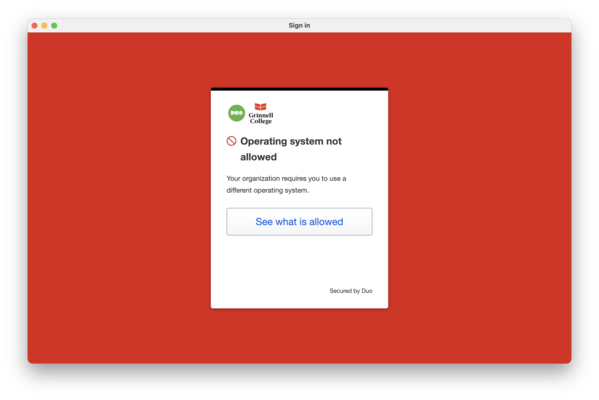
Adobe Creative Cloud is already installed. I should just be able to log in. Unfortunately, Duo doesn’t believe that I’m on a valid computing device (see the screenshot at the start of this musing). A visit to ITS revealed that I need to log in by selecting Additional Options
and then Microsoft Login
, or something like that. Ah, the joy of interacting software. Duo thinks it’s Adobe’s fault. Adobe thinks it’s Duo’s fault.
Simple Comic
I need to entertain myself from time to time.
Hmmm … I’m not sure that I’ve requested permission to install this. I better do so. I wonder if I’m the only one who puts in ticket when they install software that’s not on the list of approved software.
Are you wondering what software I’ve installed in the past? (I won’t necessarily add all of it this year.) Let’s see …
Arc Browser, AdBlock Puls, Airtae, Amazon Music, BlackHole (now approved), Boom2, Camtasia, Discord Utils, DiskDrill, DisplayLink (now standard software), Docker (now approved), Edge, GPG Suite, Grammarly, Homebrew (now approved), Kindle, LiveCode, LunaScpae, MenuBarX, MySQLWorkbench, OmniDiskSweeper, OmniFocus, Opera, Orion, PDFExpert, Paypal Honey, Pharo, SendToKindle, Sequential, Slack, SpeedTest, TechTool Pro, The Unarchiver (now seems to be installed by default), ToDoist (approved), Toast, Trello, VLC (approved), VirtualBox, XQuartz, Zoom (semi-approved), cpdf, iCab, and when2meet.
Isn’t that a fun list? There was a point at which I tried to install every browser I could find on the Mac. I may do that again. Chrome comes pre-installed. Brave may be approved. Or maybe I need to put in a ticket for Brave, too. I suppose that will wait until my next Install Browsers
activity.
Slack
Install software with Homebrew
Most of these are easy; just brew install PACKAGE. [15] Some are a bit more complex. I’ve added a few notes on most packages.
Ruby
One of many scripting languages I use regularly, either directly or indirectly. While macOS comes with a version of Ruby installed, I prefer to install it myself so that I can add packages without having root privileges [17].
Jekyll
I use Jekyll to build many of my Web sites, particularly my course sites. Hence, I need to have Jekyll installed. Fortunately, I already wrote instructions for that.
Pandoc
The Swiss-Army knife of document format converters.
imagemagick
A Swiss-Army knife of command-line image manipulators. I use it to resize images.
Hmm … The command has been updated from convert to magick. Unfortunately, it looks like the command-line parameters have changed.
$ convert -resize 600x400 neverland-cast-large.png ncl.png
WARNING: The convert command is deprecated in IMv7, use "magick" instead of "convert" or "magick convert"
$ magick -resize 600x400 neverland-cast-large.png ncl.png
magick: no images found for operation `-resize' at CLI arg 1 @ error/operation.c/CLIOption/5481.
I hope to find time to learn the new command-line syntax [18].
wget
Easy file downloading from the command line [19].
TeXlive
What kind of computer scientist would I be if I didn’t use some variant of TeX, at least from time to time?
Futz with Terminal
Somewhere in the midst of all this, while doing some real work, I discovered that I could not access my Desktop through Terminal. Not as a normal user. Not as root. Not at all.
After a visit with ITS, I was reminded that I need to give full disk access to Terminal in System Settings … -> Privacy & Security. That’s not something that I do often enough to recall.
And more
Then there are some other things that I get reminded of along the way.
- Add plugins to Safari (Ghostery, LastPass, Honey [20]).
- Log in to grinnell.edu in many places (browsers, Webex).
Another day done
Between other work I was getting done (or trying to get done), three meetings, and two trips to ITS, that was about all I got done on my second day.
So now we’re on to the third day of updating my machine. I hope that there’s less today. I’ll probably miss some things. At some point, I’ll need to get all my files in place (and perhaps experiment with restoring apps).
System settings
I’m bothered by the changes to my text when I type email. So, I need to turn off smart quotes and such. This change is one of those things that, well, changes from version of macOS to macOS. Let’s see. System Preferences… [21] Keyboard. Input Sources: Edit… Turn off all those things I dislike (Correct spelling automatically, Capitalize words automatically, Use smart quotes and dashes). I hope that’s it.
The menu bar
There are so many things in my menu bar that they slip behind the black area in the bar. I wish I had better control over what’s there.
ITS puts so much stuff that there’s not necessarily room for what I’d like. What does ITS add? Here’s my list: InformaCast Desktop Notifier, paloalto Global Protect, Microsoft Defender, CrashPlan, Self Service, ThreatDown (formerly known as Malwarebytes), and BeyondTrust. Am I allowed to remove those? Can I remove them?
Let’s see. I can quit the CrashPlan menubar app. We’ll see if that shows up again the next time I reboot.
I had no luck removing Microsoft Defender from the menu bar. I also had no luck removing InformaCast. I suppose I could quit InformatCast, but that seems like a bad idea. ThreatDown doesn’t seem to have a desktop application. Self Service does seem to have a desktop app, but I’d prefer to keep it in the menu bar. There doesn’t seem to be a way to remove BeyondTrust. Perhaps I’ll need to visit with ITS, or at least submit some tickets.
What’s next? There are the icons that applications choose to add themselves. Outlook. Zoom.us (turns out that it’s only there when it’s running). Maybe Webex. I managed to get rid of all of those.
Which ones do I add? The two accessibility ones.
I also turned the fast user switching to provide the user id rather than the user name.
Startup items
I try to avoid too many Startup items. What ones are currently set? Microsoft SharePoint. Nope, don’t want that. Webex. Nope, don’t want that. That was easy.
Wait a minute. When did those get moved under the General tab rather than the Users & Groups tab? Oh well. I’m glad to see that there are only two startup items. Or maybe only two startup items under my control. Presumably, the many ITS applications are also startup items.
Copying files
I have some files, such as my records of student grades, academic honesty cases, or NSF reviews (temporary) that I don’t think should be in my home folder. So, I have a private folder set up elsewhere on the computer. I started that process to avoid having CrashPlan copy the files. I need to restore that. There are other things in that folder, like some of my music and books, that I’d also prefer not to have CrashPlan back up. Restoring that folder takes some time, even reading from a relatively fast SSD.
I wish I had time to go through my files and directories one by one to clean out things I don’t need. I suppose that’s a task for another day [22].
Backing it up
I’m a bit reluctant to back up to my old Time Machine backup. After all, it can’t recognize that I should have access to my user folder from the old backup. So, I’ve ordered a new backup disk. That’s not an ideal strategy, but I can’t think of a better one.
And another day
Since I didn’t manage to post this on Friday, I’m going to add a bit of work for another day. I think today is Saturday, 24 May 2025.
Test the musings software
I have a weird workflow for building the musings that includes both pandoc (see above) and some scripts I wrote to handle footnotes and executable code [23].
Test the grade report software
I wrote a program to generate grade reports for CSC-151 students (also CSC-207 students and probably students in other classes). It’s designed to give the a checklist of what they’ve done and what they haven’t done based on the data I download from Gradescope. (It’s possible to handle mastery grading by having students resubmit work in the same assignment; I prefer to give new assignments for each redo.) I wrote the original version a few years ago. It’s in Perl.
Like most programs written in Perl, it relies on a bunch of libraries. Those all need to get reinstalled. Which ones? Well, these are the ones I had to install.
Text::CSV, to parse CSV files.Switch, to write C-like switch statements. At least that’s what I think it’s for.DateTime, to do date/time processing.ConfigReader::Simple, for reading configuration files.
I see that my code file also has the following.
Pod::Usage, to print usage information.List::Util, forminand `max.Getopt::Long, for getting command-line options.
I’m not sure if those got installed along the way (e.g., with Text::CSV), but I don’t seem to need to install them explicitly.
In any case, here’s the command I should remember next time.
$ cpan install Text::CSV Switch DateTime ConfigReader::SimpleHmmm … Didn’t we just have a CS Table about Software Supply Chains / Dependencies?
Concluding thoughts
That was a lot of work. I really wish that ITS would let me restore my account from my Time Machine backup.
Postscript: Thank you to all the wonderful folks in ITS who try to solve my problems. As I say, I can usually fix easy problems myself, so you only see me when there are complex problems.
I suppose that’s not completely correct; from time to time, I used to show up to make a point about something. I’ve stopped.
Postscript: Should I mention that I use Grammarly to help me edit my text? Most readers realize that by now, since I make snarky comments about its suggestions. I’m pretty sure I’ve mused about it. Yup. Back in 2017, almost eight years ago. I also regularly reject Grammarly’s suggestions. Believe it or not, but I don’t want to sound more confident. I’m confident enough as it is.
In any case, my primary goal in using Grammarly this time was to use it for a quck spell check. However, I ended up reacting to strange suggestions. I hope you enjoyed my reactions.
[1] Grinnell’s Information Technology Services.
[2] Black Belt Help
, I believe.
[3] Commencement.
[4] I suppose it’s really the College’s laptop. You understand what I mean.
[5] Time Machine is probably a registered trademark of the H.G. Wells. Or it should be.
[6] More precisely, I was going to bring my time machine backup up to date.
[7] Jamf is software for remotely managing Macs. The name is not an acronym. But it could be. Just A Mac, Fubar! [8]
[8] FUBAR stands for Fouled up beyond all recognition
. It may or may not be the source of the metasyntactic variables foo
and bar
.
[9] Jamf, again.
[10] Migration Assistant is not a registered trademark of the Trump Administration.
[11] More precisely,
This Mac can’t be used to migrate data.
Due to an issue with unlocking this system, you can’t migrate. Please update this Mac and retry.
[12] That’s my term, not theirs.
[14] There was a lot to write. I ended up writing most of the musing after the data copied.
[15] No, Grammarly, the backtick should not go after the period. The period is not part of the command.
[16] Someday I’ll remember to run time when I do these commands so that I can complain about how long it takes.
[17] The question about whether I should have root privileges on my laptop is a complicated one. The compromise I’ve worked out with ITS is that I can temporarily increase my privileges when I need to.
[18] Dear Grammarly, I hope to learn
, which you suggested, is not the same as I hope to find time to learn
, which I wrote. I know that I can learn. Time is what I hope for.
[19] Should command line
be hyphenated? I don’t think so.
[20] I suppose I’m evil for using Honey. Maybe I should just disable it on Amazon.
[21] Mustn’t forget those ellipses. They signify something. They were even part of the original Apple User Interface Guidelines. I’m pretty sure that few people know what they mean. I’ve yet to encounter any students who do.
[22] I have enough files that it’s probably another week. A full-time week. Perhaps a month. Certainly a month if I start looking through my external drives.
[23] Yeah, I realize that that’s probably unsafe. But no one else can edit my musings. And if they could edit the musings, they probably have access to my filesystem already.
Version 1.0 released 2025-05-24.
Version 1.0.1 of 2026-04-04.
The opinions stated herein are those of Samuel A. Rebelsky and do not necessarily reflect those of Grinnell College, Grinnell's Computer Science Department, the Rebelsky family, CMD-IT, SIGCAS, SIGCSE, any other organizations I am or have been affiliated with, or even most other sentient beings.
Check accessibility with WAVE.Copyright © 2016–25 Samuel A. Rebelsky.

SamR's Assorted Musings and Rants: Attempting to restore my MacBook (#1348)
by Samuel A. Rebelsky is licensed under a Creative Commons Attribution 4.0 International License.
This Web site was built using Markdown, some custom scripts, Twitter Bootstrap, and the Bootswatch Readable Theme.