Adobe idiocies (#1402)
Topics/tags: Rants, Technology, short, post-scripted
Today I tried to install Adobe Acrobat on my laptop (a somewhat old MacBook pro). It should be easy, right? I have a license through the College. It’s fairly standard software.
I employed the obvious method: I went to the Adobe site, signed in, and downloaded the Acrobat installer. Then I started it. Here’s what I saw:
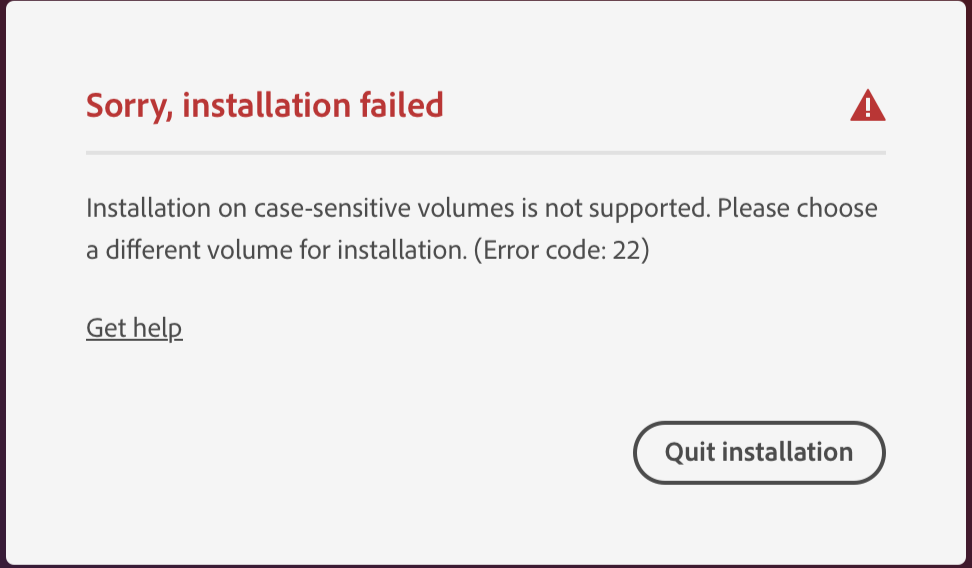
What?
Who designs software that fails on a case-sensitive volume? Adobe used to be a typography company. Don’t they understand that letters can come in multiple forms?
I didn’t pay enough attention to the dialog, so I dug out an external drive, reformatted it to be case insensitive, and started the installer again. Then I realized that there’s no option to select another drive. The only acceptable drive is your startup drive.
I checked the help page. Adobe suggests that you erase your drive and re-initialize it to be case insensitive. That’s right, They want you to reformat your startup drive to install their software!
I suppose I won’t be running Adobe products any time in the near future.
Postscript: The last time I said something was difficult, my Dean suggested an easier way to approach it, and another reader suggested a different approach. I wonder if any of my readers have an idea on how I can still install Acrobat.
Postscript: I suppose I have one approach. I could set up a virtual machine on my laptop and someone convince that virtual machine that it has a case-insensitive drive. That seems like a lot of work.
Postscript: Here’s an even more fun approach: I could ask ITS for help. However, I don’t think that’s a good use of their time.
Version 1.0 of 2026-04-05.
The opinions stated herein are those of Samuel A. Rebelsky and do not necessarily reflect those of Grinnell College, Grinnell's Computer Science Department, the Rebelsky family, CMD-IT, SIGCAS, SIGCSE, any other organizations I am or have been affiliated with, or even most other sentient beings.
Check accessibility with WAVE.Copyright © 2016–25 Samuel A. Rebelsky.

SamR's Assorted Musings and Rants: Adobe idiocies (#1402)
by Samuel A. Rebelsky is licensed under a Creative Commons Attribution 4.0 International License.
This Web site was built using Markdown, some custom scripts, Twitter Bootstrap, and the Bootswatch Readable Theme.