Mini-Project 10: Bit trees and Braille
- Assigned
- Thursday, 21 November 2024
- Summary
- We explore mechanisms for representing binary information and the use of such mechanisms for converting to and from Braille and Braille symbols
- Collaboration
- Each student should submit their own responses to this project. You may consult other students in the class as you develop your solution. If you receive help from anyone, make sure to cite them in your responses.
This assignment is adapted from the Including A11y in CS project entitled “Braille Binary Tree“.
The starter code for this project can be found on GitHub at https://github.com/Grinnell-CSC207/mp-bit-trees-maven.
Introduction
Braille is a tactile writing system used by people with visual impairments. Traditionally, braille was written by embossing paper. Today, people typically use a braille writer, such as a portable braille notetaker or computer that prints with a braille embosser. As for reading computer screens, braille users have the option of using refreshable braille displays. What makes it refreshable is whenever the user moves their cursor through keyboard or voice commands, the display updates the dots in the braille cells.

(Figure 1) Person using a screen reader, by Elypse at stock.adobe.com.
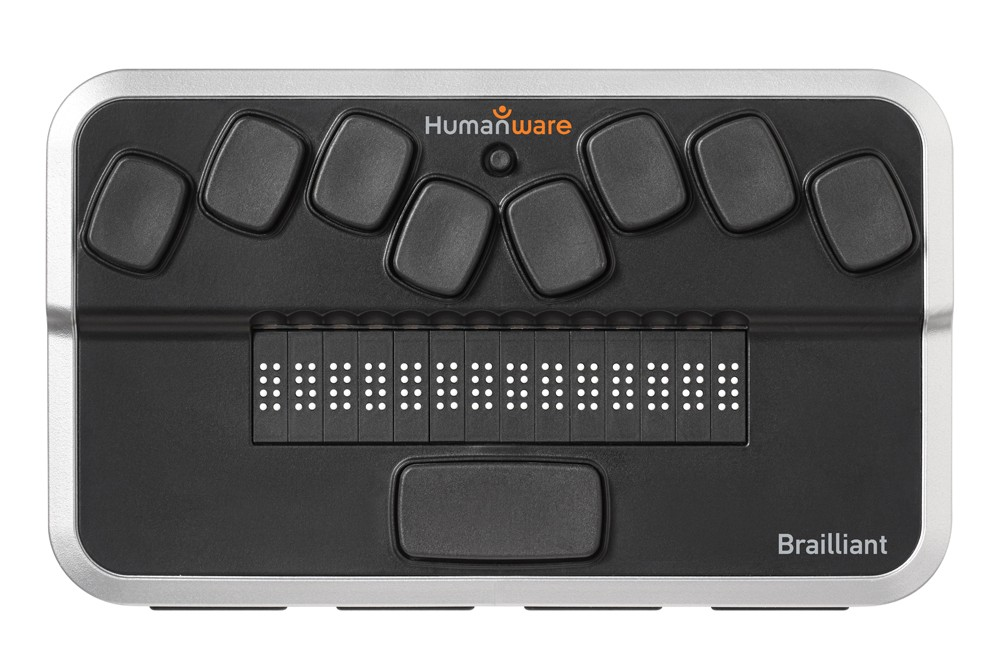
(Figure 2) An example of a braille display, from PaTTAN
In this project, you will explore mechanisms for representing text in standard Braille and converting between Braille and other representations.
About Braille
As you know, computers encode all information, including strings, using binary enncoding.
Braille was the first writing system with binary encoding. The system as devised by Louis Braille consists of two parts:
- Character encoding that mapped characters of the alphabet to six bits (0’s and 1’s).
- The physical representation of those six-bit characters with raised dots in a braille cell.
Within an individual cell, the dot positions are arranged in a three by two grid. A raised dot can appear in any of the six positions, producing sixty-four possible patterns, including one in which there are no raised dots.
A braille letter is commonly described by listing the positions where dots are raised. The positions are universally numbered, from top to bottom, as 1 to 3 on the left column and 4 to 6 on the right column. For example, an “M” is represented with cells 1, 3, 4 raised and 2, 5, 6 lowered (⠍).
1 4
2 5
3 6
(Figure 3) Braille cell numbering
Here’s the full French/English (I’d call it “European”) braille description, showing how Braille divided letters into “decades” of ten letters. You’ll notice that “W doesn’t follow the pattern; that’s because French did not use the letter W when Braille developed his system.
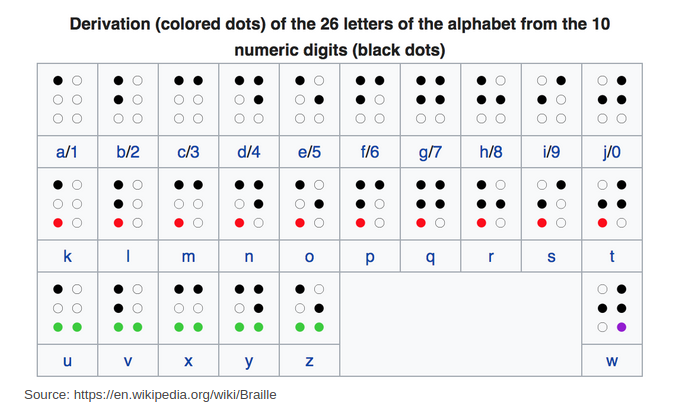
(Figure 4) The alphabetic letters in English braille, taken from Wikipedia
If you’re wondering about the accented letters that French uses, you can find them where the accented letters are, you can find them in French Braille.
In any case, we will need to think of braille encodings as six bits, numbered from 1 to 6, left to right. For example, M is 101100.
Braille as a binary tree
Suppose we were writing a program that helps someone learn braille. How might we efficiently store a table that allows us to convert a braille letter to an alphabetic letter?
One approach would be to use a binary tree, one in which a 1 in the input means “go left” and a 1 in the input means “go right”. The leaves of the tree will be the values that correspond to the bits we followed to get there. For example, if we start at the root and follow edges in the sequence right (1), left (0), right (1), right (1), left (0), and left (0), we should reach the letter “M”
Note that in these “Bit trees”, the interior nodes have no associated values; only the leaves have values.
Since English braille uses only six bits (and always uses six bits), a binary tree for English braille should have seven levels.
In contrast, if we were using a bit tree to convert ASCII characters to braille, we might need eight (7-bit ASCII) or nine (8-bit ASCII) levels.
Assignment
Bit trees
Create a class, BitTree, intended to store mappings from bits to values.
- A constructor,
BitTree(int n), that builds a tree that will store mappings from strings ofnbits to strings. We’d build our tree for mapping braille to ASCII withnew BitTree(6). We’d build our tree for mapping ASCII to braille withnew BitTree(7)ornew BitTree(8). Do not create nodes in the tree until they are needed. - A method,
set(String bits, String value), that follows the path through the tree given bybits(adding nodes as appropriate) and adds or replaces the value at the end withvalue.setshould throw anIndexOutOfBoundsExceptionifbitsis the inappropriate length or contains values other than 0 or 1. - A method,
String get(String bits), that follows the path through the tree given bybits, returning the value at the end. If there is no such path, or ifbitsis the incorrect length,getshould throw anIndexOutOfBoundsException. - A method,
void dump(PrintWriter pen), that prints out the contents of the tree in CSV format. For example, one row of our braille tree will be “101100,M” (without the quotation marks). - A method,
void load(InputStream source), that reads a series of lines of the formbits,valueand stores them in the tree.
You will likely find it useful to create a BitTreeNode interface, a BitTreeInteriorNode class (which contains fields for the children), and a BitTreeLeaf class (which contains a field for the string). You might instead make do with a BitTreeNode class that has both a value (for when it’s a leaf) and two children (for when it’s an interior node), but the subclassing is a bit cleaner.
Braille trees
Create a class BrailleAsciiTables, that provides the following static methods:
String toBraille(char letter), which converts an ASCII character to a string of bits representing the corresponding braille character.String toAscii(String bits), which converts a string of bits representing a braille character to the corresponding ASCII character.String toUnicode(String bits), which converts a string of bits representing a braille character to the corresponding Unicode braille character
Within the class, you must store the translation information (from ASCII to braille, from braille to ASCII, and from braille to Unicode) as bit trees. You can find the translation tables in the starter code (or you could read them from files).
Feel free to throw a runtime exception if you get an invalid input to any of these methods. (Since the underlying BitTree objects throw an IndexOutOfBoundsException
Utility program
Create a Main class, BrailleASCII, that takes two command-line
parameters, the first of which represents the target character set
and the second of which represents the source characters, and that
translates the text. For example,
$ alias ba="java -cp target/classes edu.grinnell.csc207.main.BrailleASCII"

$ ba braille hello
110010100010111000111000101010
$ ba ascii 110010100010111000111000101010
HELLO
$ ba unicode hello
⠓⠑⠇⠇⠕
$ ba unicode "hello world"
⠓⠑⠇⠇⠕⠀⠺⠕⠗⠇⠙

$ ba braille abc123
100000110000100100
Trouble translating because No corresponding value
$ ba ascii 11001010001011100011100010101
Invalid length of bit string
Preparation
a. Fork the repository at https://github.com/Grinnell-CSC207/mp-bit-trees-maven.
b. Clone that repository.
cd ~/CSC207/MPs                 # Or the directory of your choice
git clone git@github.com:USERNAME/mp-bit-trees-maven.git
c. Open the project in VSCode.
d. Update the README.md appropriately.
e. Push the updated README to GitHub.
cd ~/CSC207/MPs/                # Or the directory of your choice
cd mp-bit-trees-maven
git add README.md
git status
git commit -m "Update README."
git pull
git push
f. Add an upstream repository just in case I make changes.
cd ~/CSC207/MPs/                # Or the directory of your choice
cd mp-bit-trees-maven
git remote add upstream https://github.com/Grinnell-CSC207/mp-bit-trees-maven
In the future, you can grab changes using the following.
git fetch upstream
git merge upstream/main
You can also just click the Sync Fork button on your GitHub page for the fork.
Draft rubric
Submissions that fail to meet any of these requirements will get an I.
[ ] Passes all the **R** tests.
[ ] Includes the specified `.java` files, correctly named.  (They should
    be in the appropriate package.)
[ ] Each class has an introductory Javadoc comment that indicates
    the author and purpose.
[ ] Includes a `README.md` file that contains the appropriate information
    (authors, purpose, acknowledgements if appropriate)
[ ] All files compile correctly.
Meets expectations or above
Submissions that fail to meet any of these requirements but meet all previous requirements will receive an R.
[ ] Passes all the **M** tests.
[ ] No more than fifteen style errors.
[ ] Command-line examples work.
Exceeds expectations
[ ] Passes all the **E** tests.
[ ] No more than five style errors.
[ ] All (or most) repeated code has been factored out into individual methods.
[ ] All or most variable names are appropriate.
Tables
Braille to ASCII
100000,A
110000,B
100100,C
100110,D
100010,E
110100,F
110110,G
110010,H
010100,I
010110,J
101000,K
111000,L
101100,M
101110,N
101010,O
111100,P
111110,Q
111010,R
011100,S
011110,T
101001,U
111001,V
101101,X
101111,Y
101011,Z
010111,W
000000,
Braille to Unicode
000000,2800
100000,2801
010000,2802
110000,2803
001000,2804
101000,2805
011000,2806
111000,2807
000100,2808
100100,2809
010100,280A
110100,280B
001100,280C
101100,280D
011100,280E
111100,280F
000010,2810
100010,2811
010010,2812
110010,2813
001010,2814
101010,2815
011010,2816
111010,2817
000110,2818
100110,2819
010110,281A
110110,281B
001110,281C
101110,281D
011110,281E
111110,281F
000001,2820
100001,2821
010001,2822
110001,2823
001001,2824
101001,2825
011001,2826
111001,2827
000101,2828
100101,2829
010101,282A
110101,282B
001101,282C
101101,282D
011101,282E
111101,282F
000011,2830
100011,2831
010011,2832
110011,2833
001011,2834
101011,2835
011011,2836
111011,2837
000111,2838
100111,2839
010111,283A
110111,283B
001111,283C
101111,283D
011111,283E
111111,283F
ASCII to Braille
01000001,100000
01000010,110000
01000011,100100
01000100,100110
01000101,100010
01000110,110100
01000111,110110
01001000,110010
01001001,010100
01001010,010110
01001011,101000
01001100,111000
01001101,101100
01001110,101110
01001111,101010
01010000,111100
01010001,111110
01010010,111010
01010011,011100
01010100,011110
01010101,101001
01010110,111001
01010111,010111
01011000,101101
01011001,101111
01011010,101011
01100001,100000
01100010,110000
01100011,100100
01100100,100110
01100101,100010
01100110,110100
01100111,110110
01101000,110010
01101001,010100
01101010,010110
01101011,101000
01101100,111000
01101101,101100
01101110,101110
01101111,101010
01110000,111100
01110001,111110
01110010,111010
01110011,011100
01110100,011110
01110101,101001
01110110,111001
01110111,010111
01111000,101101
01111001,101111
01111010,101011
00100000,000000
Questions and Answers
Big picture
I am confused about the roles of the tables, set method, and constructor. When should I populate the tree? Should I expect its content to change?
The
BitTreeclass is designed to allow clients to make as many trees as they want.
The
setandloadmethods are the two ways to build or extend a tree.
BrailleAsciiTablescreates three such trees. We can assume these won’t change once we’ve created them. We should create those as soon as we can.
The
BrailleASCIIclass then uses the trees (indirectly, through the methods).
Could you give time estimates for how long you think some of the methods should take us?
People vary significantly in how long they take to do things. But perhaps you’re asking this to see how I’d break up the program. These estimates also assume you don’t encounter significant problems.
interface BitTreeNode,class BitTreeInteriorNode, andclass BitTreeLeaf: Perhaps fifteen minutes for the interface and two classes. You’ve created nodes before.
BitTree.get: Perhaps ten to fifteen minutes. You’ve written methods that recurse through trees before (e.g.,BST.get), so it’s mostly repurposing ideas you’ve done before. (Most of you also wroteBST.getin about this time.)
BitTree.set: Fifteen minutes. You’ve written methods that recurse through trees before (e.g.,BST.set), so it’s mostly repurposing ideas you’ve done before. Perhaps thirty minutes if you choose a difficult approach to start with. (Most of you also wroteBST.setin about this time.)
BitTree.dump: Fifteen to twenty minutes. You’ve written code to recurse through trees. This one just requires a bit of cleverness.
BitTree.load: Between ten and thirty minutes. The hard part is mostly figuring out how to get the data from theInputStream. Once you get a line, you should know how to split it and then callset.
BrailleAsciiTables.toAscii: About five to ten minutes. This should be a call toBitTree.get.
BrailleAsciiTables.toBraille: About thirty minutes. Twenty of those minutes will be figuring out how to convert the letter into a bit string.
BrailleAsciiTables.toUnicode: About thirty minutes. Twenty-five of those minutes will be figuring out how to convert the hex code to a unicode character.
BrailleASCII.main: About thirty minutes. You’ve written code to parse command lines before. The rest is just repeated calls to theBrailleAsciiTablesmethods.
What divisions would a perfect student make while writing this MP? E.g. what parts should this whole be thought of being made up out of?
I’m not sure what a perfect student would do.
I’d start with the tree as one unit, implementing set, then get, then dump, then load.
Next up would be the tables.
And finally the UI.
See above for details.
In your opinion which class or method would be the hardest to implement and how would you break it down to make it easier?
Probably the conversion of ASCII to braille unicode. I’d say “in the obvious way” - think about what data you have, what conversions are available, and what conversions are necessary.
As someone who is just starting this assignment, what are potential challenges that could throw me off and how can I get back on track?
If I recall correctly from last semester, most of the problems stemmed from folks forgetting that each BitTree is a fixed-height tree.
Tree nodes
Why did you suggest that we have separate classes for interior nodes and leaves?
Sometimes having separate classes simplifies things. Your interior nodes will need to store links to the subtrees below them. Your leaves will store only the value.
Since we can’t have fields in an interface, what is in BitTreeNode interface?
It’s there mostly so that the interior nodes can have two BitTreeNode fields, one for the zero subtree and one for the one subtree. In most cases, those fields will be instantiated as interior nodes, but at the end, they will be instantiated as leaves.
Should BitTreeInteriorNode inherit from BitTreeNode, or should they be completely separate classes?
I’d make
BitTreeNodean interface.BitTreeInteriorNodewould then implement that interface.
Can we use the generic TreeNode class from the labs?
Sure, although I would not recommend it. You’re better off creating your own specialized node classes.
If I include a value field in my nodes, what value should I use for the interior nodes?
nullseems like a good strategy.
Do you care if I put these classes in separate files or can they be in the primary file?
It’s up to you.
How do we structure the BitTreeNode interface and its subclasses? Are there specific fields or methods we must include?
That’s one of the things I wanted you to think through. (Sorry.)
dump
Do you have any hints on the dump method?
Sure. We’ve traversed binary trees recursively before, so you’ll be doing something similar. This time, in addition to recursing over the node, you’ll also include the bit string processed so far as a parameter, and add to the string as you recurse.
For example, if we’re processing the node with bit string “0101”, when we recurse on the left subtree, we’ll pass in “01010” and when we recurse on the right subtree, we’ll pass in “01011”.
How should we hold the ‘bits so far’ information when recursing through the tree for dump?
I wrote a helper method with two parameters, one for the current node and one a string that gives the path to the node.
load
What will load look like?
Presumably, you’ll read each line, split at the comma, and then call
set.
How do I read from an InputStream?
I found it easiest to convert the
InputStreaminto anInputStreamReaderand then to aBufferedReader.
What’s the format of the InputStream source would look like so we know how to write load?
Each line is
bits,value, wherebitsis a sequence of 0’s and 1’s andvalueis a string (without quotation marks).
For the load method, should it validate the format of the input lines?
You can assume the input lines are correctly formatted.
toUnicode
How should I convert the unicode numbers to characters?
Take a look at the
Characterclass in Java.
How will we put unicode braille onto the terminal?
If you build the unicode characters appropriately, they will show up in the terminal.
toBraille
Should I handle both lowercase and uppercase letters in converting from ASCII to braille?
It would be nice, but it’s optional. The mapping above handles both, at least if I designed it correctly.
When using braille as input for traversing the tree, I’m using the bit string. What should I do with ASCII?
You could convert it to a bit string. You could use bitwise operations.
Testing
Will you provide tests?
Yes. They are forthcoming. For now, you might try the experiments.
Are there any specific tests provided to validate tree traversal and Braille conversion?
There will be.
Miscellaneous
Why are the ASCII-to-Braille trees deeper than the braille to ASCII trees?
ASCII represents more characters, so we need more bits (historically 7 or 8). We’re just using a subset of the characters that ASCII represents.
Do I have to write an Iterator for my bit tree?
Nope.
Can we put the translation tables you gave us into files and then load them in our main method?
Yes.
What is the best way to optimize tree expansion when the depth increases?
The depth doesn’t change.
How do you recommend we go about incorporating the tables into our program?
That’s a fairly broad question. Presumably, your BrailleASCII program will rely on them in its translation.
More questions
What do you mean by “don’t fill in the nodes until necessary”?
Consider the call
new BitTree(3).
That could be a tree with four levels (one node at level 0, two nodes at level 1, four nodes at level 2, eight nodes at level 3).
We could build all fifteen nodes at once, but that would be wasteful. And we wouldn’t have anything to put in the leaf nodes. So we instead only add nodes when we call
set.
Acknowledgements
The introductory text and the overall idea for this assignment were taken from a laboratory by the A11y in CS project. The restructuring of the assignment as multiple bit trees, the introduction of Unicode, and the conversion to Java are due to Sam Rebelsky.