Mini-Project 5: Augmentive and Alternative Communication Devices
- Assigned
- Thursday, 3 October 2024
- Summary
- In this mini-project, you will use an extended version of the AssociativeArray class from the last mini-project to build a simple AAC.
- Collaboration
- Each student should submit their own responses to this project. You may consult other students in the class as you develop your solution. If you receive help from anyone, make sure to cite them in your responses.
In this mini-project, you will explore (a) the use of associative arrays and other kinds of maps, (b) programming to specifications in support of a larger project, (c) dealing with conflicting approaches to Java programming (and homework assignments in CS), and (d) considering some of the issues at play in designing software for people with disabilities (as well as using software as a disabled person).
This project will not use Maven.
The assignment
Do the assignment at https://accessibilityeducation.github.io/assignments/AAC/AAC.html, using your AssociativeArray class instead of HashMaps. Please leave your AssociativeArray, KVPair, and exception classes in the edu.grinnell.csc207.util package, but copy that package into this project..
Recommended stages
To do this assignment, you should follow these steps, modifying them as you consider appropriate.
- Read the instructions and background.
- Fork and clone the repository at https://github.com/catiembaker/AACNestedHW.
- Remove the
.projectfolder from the repository. - Add your AssociativeArray code to the repository (presumably in
src/edu/grinnell/csc207/util). - Review the
AACCategoryspecifications given at https://accessibilityeducation.github.io/assignments/AAC/AACCategory.html and start planning your design.- Add slightly more sophisiticated stub methods to the implementation. (See below for some suggestions.)
- Note that your
AACCategoryclass will likely contain anAssociativeArray<String,String>that maps image locations (strings) to words (also strings).
- Review the
AACMappingsspecifications given at https://accessibilityeducation.github.io/assignments/AAC/AACMappings.html and start planning your design.- Add slightly more sophisiticated stub methods to the implementation. (See below for some suggestions.)
- Note that your
AACMappingsclass will likely contain anAACCategoryobject that maps filenames to their corresponding words. You may also want anAssociativeArray<String,AACCategory>that maps either filenames or names to categories. - Sample stub versions of
getImageLocs(),getText(String), andgetCurrentCategory()follow.
- Run the application to get a basic sense of how it works (or should work).
- Warning! At least on my computer, it takes a while to load.
- Warning! As distributed, it only works with one category. You should comment out line 52 of
AAC.java, which readsthis.page = new AACCategory("text");and uncomment line 53, which readsthis.page = new AACMappings(filename);.
- Start implementing methods.
Note that you will likely need to update AssociativeArray to support methods like getImageLocs().
Sample stub methods
  public String[] getImageLocs() {
    return new String[] { "img/food/icons8-french-fries-96.png", "img/food/icons8-watermelon-96.png" }; // STUB
  } // getImageLocs()

  public String select(String imageLoc) {
    return "television";  // STUB
  }

  public String getCurrentCategory() {
    return "food";  // STUB
  }
Submitting
Upload your code to Gradescope using the GitHub approach. (Note that doing so takes the current version of your GitHub repo. If you make further changes to your repo, you will need to upload more.)
Testing
I may provide a test suite and instructions for using it in VSCode without Maven. Stay tuned.
1. Temporarily quit VSCode.
2. Remove the files .classpath and .project from your project.
3. Add the test files to your src directory: TestAACCategory.java and TestAACMappings.java.
4. Restart VSCode.
5. Click on the Testing/Beaker icon.
6. You should see a button to “Enable Java Tests”. Click it.
7. In the menu that appears, select “JUnit Jupiter”. VSCode will download the JUnit 5 jar file.
8. Run the tests as normal.
Grading rubric
Redo or above
Submissions that fail to meet any of these requirements will get an I.
[ ] Passes all **R** tests.
[ ] Passes all **R** scripts.
[ ] Includes the specified `.java` files, correctly named.  (They should
    be in the appropriate package.)
[ ] Each class has an introductory Javadoc comment that indicates
    the author and purpose.
[ ] Includes a `README.md` file that contains the appropriate information
    (authors, purpose, acknowledgements if appropriate)
[ ] All files compile correctly.
Meets expectations or above
Submissions that fail to meet any of these requirements but meet all previous requirements will receive an R.
[ ] Passes all **M** tests.
[ ] Passes all **M** scripts.
    [ ] Correctly loads the configuration file.
    [ ] Correctly switches to subcategories.
    [ ] Appropriately identifies words associated with images.
Exemplary / Exceeds expectations
Submissions that fail to meet any of these requirements but meet all previous requirements will receive an M.
[ ] Passes all **E** tests.
[ ] Passes all **E** scripts.
    [ ] Correctly switches to the default screen.
    [ ] Correctly adds an image to a subcategory.
    [ ] Correctly adds an image to the top-level category.
    [ ] Correctly add an image to a new empty category.
    [ ] Correctly saves the updated configuration.
[ ] All (or most) repeated code has been factored out into individual
    methods.
[ ] All or most variable names are appropriate.
[ ] `AACCategory` and `AACMappings` do not access any fields in
    `AssociationList` or `KVPair`.
Grading scripts
Script for R
- Open the project in VSCode.
- Run AAC.java.
- Make sure a window appears.
Script for M
- Open the project in VSCode.
- Run AAC.java. Ideally, you’ll see the following.

- Click on the plate icon. Ideally, you’ll see the following.
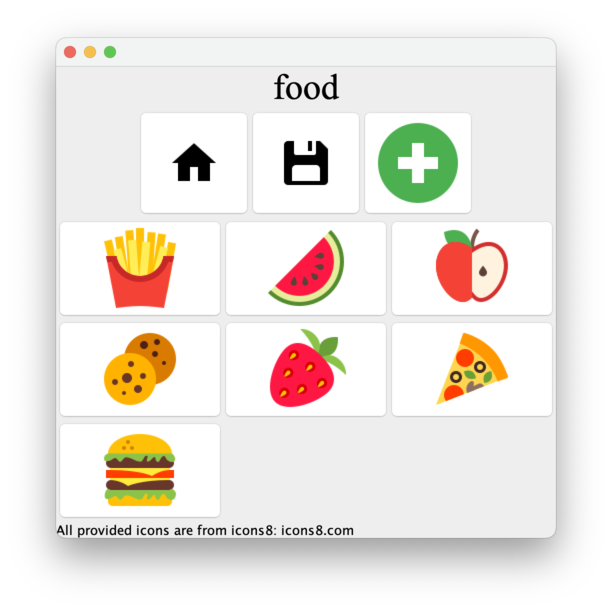
- If you’ve made it this far, it appropriately switches to a category.
- Click on each food icon and make sure it says the right thing. Pay particular attention to “french fries”, since it’s two words.
- If you’ve made it this for, it appropriately identifies words associated with images.
- Click on the home icon. You should end up back on the home page.
- If you’ve made it this far, it correctly switches to the home page.
- If it doesn’t get back to the home page, quit and restart to get back to the home page.
- This time, click on the hanger icon. Ideally, you’ll see the following.
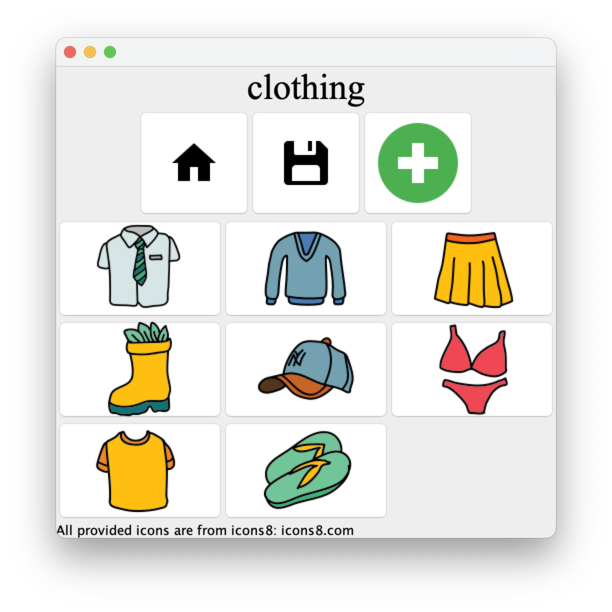
- Click on each clothing icon and make sure it says the right thing. Pay particular attention to the two-word icons, such as “collared shirt” and “swim suit”.
- Quit the program.
Second script for M
- Rename the file
AACMappings.txttoAACMappingsOld.txt - Put the following into the file
AACMappings.txtimg/clothing/collaredshirt.png tops >img/clothing/collaredshirt.png collared shirt >img/clothing/sweater.png sweater >img/clothing/tshirt.png t shirt img/food/icons8-apple-96.png fruit >img/food/icons8-apple-96.png apple >img/food/icons8-watermelon-96.png watermelon >img/food/icons8-strawberry-96.png strawberry >img/food/plate.png strange disc-like fruit - Start the program. This time, you should see the following home page.

- Click on the shirt icon and make sure you switch to the tops page, which should look like this.

- Click on the home button to return home.
- Click on the apple button and make sure you switch to the fruits page, which should look like this.
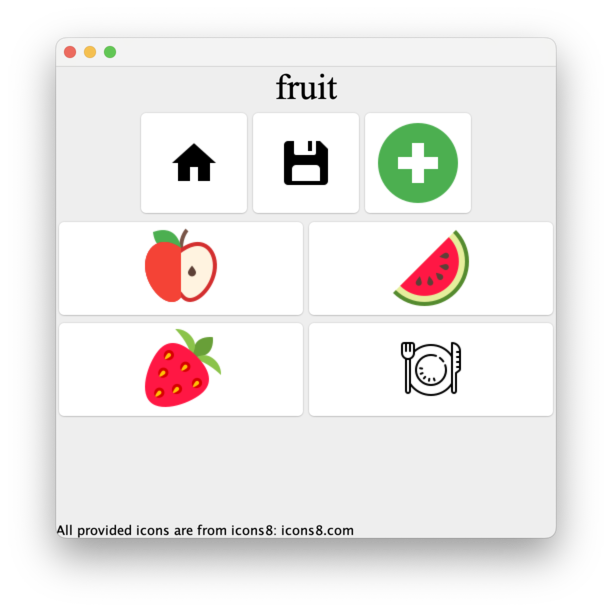
- If you’ve made it to here, it correctly loads the configuration file.
- Quit the program.
- Restore the original
AACMappings.txt
Script for E
- Open the project in VSCode.
- Run AAC.java.
- Click on the hanger icon. You should end up on the clothing page.
- Click on the Plus sign. You should be prompted for an icon.
- Navigate to the project’s image folder and select the hanger image.
- You should be prompted for text. Enter “Hanger”. You should now see the following.
- Click on the hanger icon and make sure that it says “hanger”.
- If you’ve made it this far, it correctly adds an image to a subcategory.
- Return to the home screen by clicking the home button.
- Click on the Plus sign. You should be prompted for an icon.
- Navigate to the project’s image folder and select the Home image.
- You should be prompted for text. Enter “household”. You should now see the following.
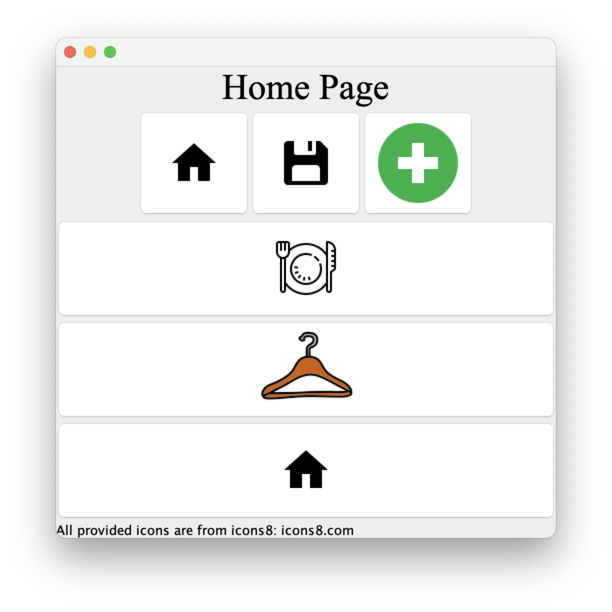
- Click on the new button home button (the one at the bottom of the page). You should now see the following.
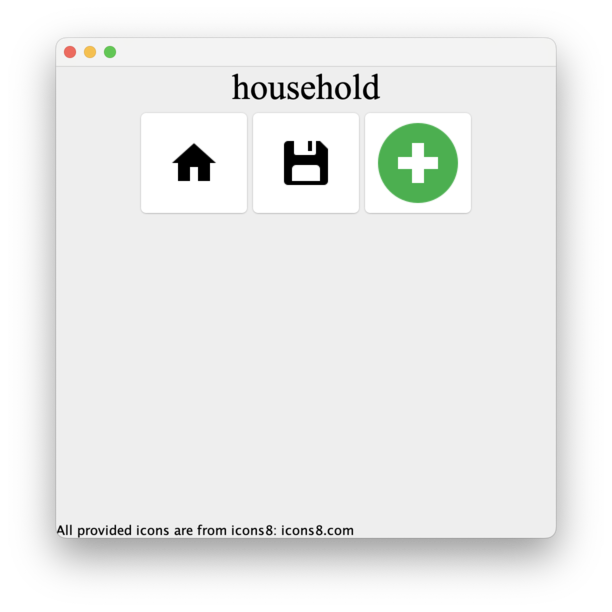
- Click on the Plus sign. You should be prompted for an icon.
- Navigate to the project’s image folder and select the hanger image.
- You should be prompted for text. Enter “Hanger”. You should now see the following.
- If you’ve gotten this far, they’ve correctly added an image to a new empty category.
- Click the Save icon (the computer disc).
- The file
AACMappingsNew.txtshould appear in the project. - Open the file and make sure it appears to include the newly-added components.
Q&A
Planning your work
Would you have any recommendations for figuring out a way to initially approach the project? As in ways to go about coming up with a “plan of attack”?
I’d start by making sure I have a general understanding of each of the methods I need to implement; what its goals are and such.
I’d then write a “stub” method for everything in
AACCategory.javajust so that I can see the approximate behavior.
I’d replace the stubs with real code. I don’t know whether that will work better one at a time or en masse.
I’d switch over and do the same thing in
AACMappings.java, although that has some things that will be a bit harder to stub (such as the constructor).
Are there general themes/tips you have?
In my experience, implementing both
AACCategory.javaandAACMappingsis primarily an exercise in appropriate delegation. If you have an Associative Array inAACCategory, almost all of the method calls can be directly delegated to that Associative Array.AACMappingsis a bit more complicated, as you will likely have both an Associative Array (that maps images to categories) and a “current”AACCategory. When you’re at the top level, you will likely delegate to the associative array. When you’re in a category, you’ll delegate to the currentAACCategory.
Adding data
How do we add new categories?
It seemed from the specs that categories are only created when you load the file upon creating a new
AACMappings. However, upon looking at the underlying code, I determined that any images on the default screen are considered categories.
Sam’s implementation
I hear you also did this MP. What part did you find hardest?
Yes, I did this MP. Twice, once in Fall 2023 and once in Fall 2024. I try to do most of them. I found writing a
keysmethod forAssociativeArraythe hardest part because creating arrays using generics is painful. I assume there’s a good way to do it, but I always find myself struggling.
How did you address the problem?
Since we only need an array of strings I was tempted to write at
String[] keyNamesmethod (and I’d recommend that you’d do so). However, that seemed like an easy out. If I were re-designing the assignment, I’d probably require that we provide an iterator for keys rather than an array of keys.
In the end, I used something similar to the mechanism I used in the constructor. That is, I used
Arrays.newInstanceusing the first key in the pairs array to specify the type.
AACMappings and AACCategory
*What is the relationship between AACCategory and AACMappings? From what I can tell mapping is a “list” of all of the categories and keeps track of the current one.
That’s mostly correct. I think of
AACMappingsas a dictionary of all the categories (it maps category names toAACCategoryobjects) along with a bit of extra information.
Should we add all of the methods from AACCategory and AACMappings, or are there any we don’t need?
You should implement all of them.
Should AACCategory and AACMappings share an interface?
I would have “No; they have different responsibilities. (They also have some similar responsibilities, which complicates matters a bit.)”
However, in a recent update to the assignment, it appers that Dr. Baker has rearranged the design so that both classes implement the
AACPageinterface.
Is there any specific method for testing the interaction between AACMappings and AACCategory? How can I ensure I’m handling category switching correctly?
As the program is designed, the only way to test is to try the program. I’ve written some tests (see above).
AACMappings
Why do you think our AACMappings class would benefit from a field
of type AssociativeArray<String, AACCategory>?
You’ll need to keep track of the AACCategory for each image on the top-level page.
Why do you think our AACMappings class would benefit from a field
of type AACCategory?
You’ll need to keep track of the location-to-name mappings somewhere. I think it’s easier if you use an
AACCategoryfor uniformity.
Should we use inheritance to implement the AACMappings class?
I would not use inheritance. Rather, I would suggest using “wrapping” with a field of type
AssociativeArrayand then delegating most of the commands to that field.
AACCategory
In the AACCategory class methods do we have to use getCategory to check if the image is in the category in the getImages, getText, and hasImage function or are we making an assumption that everything that we call in this class is part of the same category?
You do not need to use it to check if an image is in a particular category. Rather, we use it primarily in case the client code needs to identify the category (e.g., to speak it aloud).
We wil use it primarily to support the
getCurrentCategorymethod inAACMappings.
In a hidden design issue, the UI looks for a category of
""to decide whether it’s working with the top level.
Image files
Can I use full path names to the images?
No. That’s not portable. You should write portable code.
Can I change the names of the images?
I’d prefer that you don’t change the names of the images. It may interfere with our testing.
What do I do with the PNG files?
You’re only responsible for keeping track of the path to those files (and some corresponding information). The provided front end deals with displaying them.
Do we need to tell the computer that we’re dealing with images in any way?
Nope, you don’t have to do anything special. The image locations are just strings that the UI sends to you and you send back to the UI.
Associative Arrays
What do I do if I don’t yet have a fully working version of AssociativeArray?
Allocate some extra time to get that working. And ask for help!
What might it entail to update AssociativeArray to support getImageLocs()? (That is, what might I want to keep in mind when I think about these changes?)
You’ll need to figure out how to return an array of keys. It can be hard to build a generic array, so you may want to build an array of the keys represented as strings.
How and where are we expected to use our Associative Array class?
I would use it for both
AACCategoryandAACMappings.
Stubs
What do you mean by adding sophisticated stub methods?
A stub method is a method that is not yet fully implemented, but works enough to allow us to explore other aspects of the problem. For example, if we don’t yet have a way to get all of the images (strings giving the paths to those images), we could just return a pre-computed list of images (strings).
What are some stub methods for AACCategory?
Here’s are some that I wrote during development.
  public String[] getImageLocs() {
    return new String[] { "img/food/icons8-french-fries-96.png",
        "img/food/icons8-watermelon-96.png" }; // STUB
  } //getImageLocs()

  public String getCategory() {
    return "Whatever";
  } // getCategory()

  public String select(String imageLoc) {
    return "selected";
  } // select(String)
That was enough to get the program to start and show something.
Miscellaneous
How do I relate category, text, and image together?
In
AACMappings, you provide facilities for converting the path to an image to the corresponding category.
In
AACCategory, you provide facilities for converting the path to an image to the corresponding word.
The UI knows how to convert the path to an image to the image itself.
If we’re mapping images to words with our arrays, how are we to associate those words with sounds? Or should our implementation not worry about playing sounds when we click on the pictures, just print the words.
You will return words. The provided code speaks them.
How should error handling be implemented for methods like getImageLocs() and getText() to handle cases where the requested image location or text is not found?
Welcome to one of the conflicts between how Dr. Baker designs things and how I do. You’ll need to figure out some other way to signal an error. (Ideally, there won’t be any.) For example,
getText()might return"Not found"andgetImageLocs()might return an empty array.
What is the different usage of AACCategory and AACMappings?
AACCategoryobjects convert images (well, the path to the image) to words.AACMappingobjects (there’s only one in the program) convert images (the path to images) to categories.
Should we add all of the methods from AACCategory and AACMappings, or are there any we don’t need?
You should implement all of them.
What is the most efficient way to create and return arrays using generics without encountering ClassCastException or type erasure issues?
There isn’t a perfect way. For now, creating arrays of
Objectvalues and casting them is the best way to go. Then be careful to treat things appropriately so that you don’t store the wrong type.
How do we ensure that the methods work seamlessly with the UI provided by the project? Is there a way to test it independently before running the full application?
You could write tests.
Why am I not seeing the full UI?
As distributed, the UI only works with one category. You should comment out line 52 of
AAC.java, which readsthis.page = new AACCategory("text");and uncomment line 53, which readsthis.page = new AACMappings(filename);.