Documenting Java Code with Javadoc
Summary: We consider the various forms of documentation that programmers typically write and read and examine Javadoc, Java's tool for generating documentation for client programmers.
Forms of Documentation
Even though you are a comparatively novice programmer, you have likely
learned the importance of documenting your work (or, as importantly, of
others documenting their work). When you use a program, such as Emacs,
it helps to have documentation that lets you quickly identify how to do
particular activities. When you use a Java class that comes as part of
the standard installation, such as java.io.PrintWriter, you
hope to have clear instructions on how to build and use objects in that
class. When you're writing a method, it helps to have a short note as to
what you expect the method to do. It may also help to have some notes as
to the steps in your algorithm. (As a professor, I find it much easier
to help my students when they have documentation that explains what they
intended the method to do and how the code they've written is supposed
to accomplish this task.) Finally, when you modify the code of others
(Or even your own code a few months later), it helps to have similar
explanations: What were you trying to do and how were you trying to
do it? You can probably suggest other ways that you document your code.
It helps to classify this wide variety of kinds of documentation into three audiences:
- Users, who consult the documentation when attempting to use your program. Although in the real world, programmers are not necessarily expected to provide this kind of documentation, you will often have to provide it earlier in your programming career and it helps to remember that someone has to write such documentation.
- Client Programmers, who use the classes you design, often in new contexts.
- Colleagues, who must support and update your code.
In this document, we will focus primarily on the documentation you write for other programmers, both client programmers and colleagues.
Documenting at Many Levels
One of the first things you should observe as you write documentation for other programmers is that there are many levels of documentation you need to write, particularly if you're providing a host of classes for client or colleague (or yourself).
You should begin with a package-level overview of the various classes and objects and the relationships they play with each other. Such an overview helps guide your colleagues to the right place to find something and guides your clients as to what classes they need for different purposes and how they interact. As a client, you may have found such high-level overviews useful for figuring out how things go together. Experience suggests that high-level overviews are strengthened by sample code, but you often don't want to write that code until after you've written a few programs using your package or packages yourself.
Next, you should provide a class-level overview of each class or interface you write. Like the package-level overview, it guides your reader as to how things fit together and where things can be found. Such overviews might also include code.
Third, you should write method and field summaries that provide details about the individual fields, methods, and constructors of your classes. Typically, a field summary provides information about the intended use of the field and any special values it may take on. (For example, some programs use 0 or -1 to indicate a special situation.) The summary for a method or constructor should provide coherent information about the purpose of the method. We revisit the form and content of this summary in a subsequent section.
Finally, within each method, you document the intended purpose of each step.
When to Document?
Many programmers seem unsure of when they should write their documentation. The answer is easy: you should Document Early and Often. By early, I mean that you should write most of your documentation before you begin to code. You may have to go back and modify your comments later, perhaps as you realize that you can't meet your intent, but early documentation helps guide you when you've forgotten what you want to do (and helps others help you).
Let's consider an example: How might we document and then write a procedure for exponentiation? I begin with a full statement of what I expect the algorithm to compute.
   /**
    * Given an integer, x, and an exponent, p, compute x^p.
    *
    * @param x
    *   an integer
    * @param p
    *   a whole number
    * @pre
    *   x must be non-negative.
    *   x^p must be smaller than the largest representable integer.
    * @post
    *   The result = x*x*x* ... *x (p times)
    */
Next, we write a short summary of the algorithm or any other issues of import.
    /*
     * Algorithm: We rely on the rules that
     *   x^0 = 1
     *   x^k+1 = x^k*x
     *   x^2k = (x^k)^2
     */
Finally, we write the body with short comments of what I intend to do.
  public int exp(int x, int p)
  {
   // Base case: When p = 0, result is 1
   // Base case: When p = 1, result is x
   // Recursive case: When p is odd, result is x*(x^(p-1))
   // Recursive case: When p is even, result is x^(p^2) square
  } // exp(int, int)
Only once that infrastructure is in place do we begin coding.
Documenting Methods
As you may have noted from the above, there are a variety of things one can mention when documenting a method (or constructor). Let’s call them the Five P’s.
- Purpose: Summarize what the method does in a sentence or two (or three or four).
- Parameters: Describe the name, type, and possibly role of the parameters.
- Produces: Describe the type of the result. It may also be helpful to name it.
- Preconditions: A formal (or somewhat formal) specification of what must hold in order for the method to work.
- Postconditions: A formal (or somewhat formal) specification of the results. You should think of the purpose as giving an informal specification and the postconditions as giving a more formal specification.
What is Javadoc?
When documenting Java code, programmers traditionally use a format called “Javadoc”. Javadoc is a documentation generator developed alongside the Java programming language. (So, it was originally from Sun and is now from Oracle.) Javadoc transforms the documentation we give each method and creates nice, uniformly formatted HTML output. The Javadoc-style comments that we include in our code are called “doc comments”. You can have a doc comment for each field, constant, method, class, interface, and such. For methods, doc comments tell us what each parameter does, what the method returns, and if it throws any exceptions (they handle errors in specific cases).
How does the Javadoc processor know that you have doc comments?
It looks for comments that begin with with /** and end
with */. In Eclipse, this notation should turn the
comments blue.
In Javadoc, you indicate special aspects of your documentation
with tags that begin with an at sign. In the
sample above, you see @pre, @post, and
@param. Other important tags include:
@author- the author of the class. This tag should only be included in the Javadoc comment for the whole class@version- the version of the class (date). As above, only include in the Javadoc comment for the whole class@return- what the method returns and its type@exception NameOfException- when and why the method throws that exception
In our example, we've included @pre and @post.
These are custom tags that we must create on our own. To do
this, we write our Javadoc comments with @pre and
@post added as shown. In Eclipse, With our project
or class (for which we want to generate the Javadoc) highlighted,
we go to > . We make sure that we’re generating the
Javadoc for the right document. Normally we would just click
and let Eclipse do its job. However,
if we've added custom tags, we need to click
and again.
Under Extra Javadoc Options we want to enter:
-tag pre:cm:"Preconditions:"
-tag post:cm:"Postconditions:"
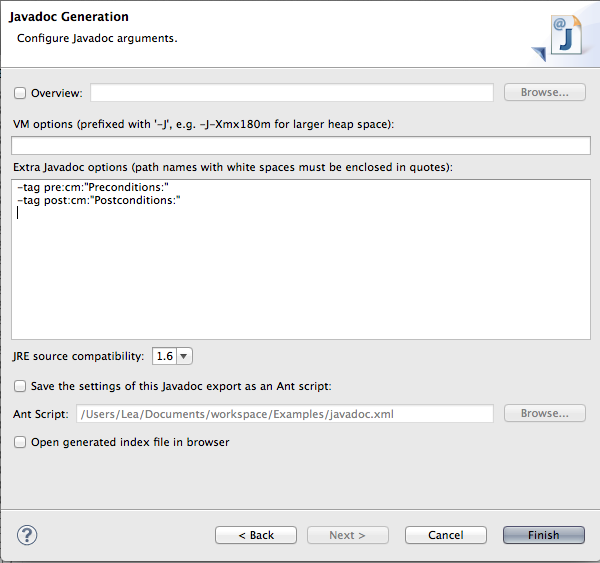
A popup window will appear. Select and make the Ant File when it prompts you for one. You’ve successfully created Javadoc documentation! To see the documentation in a Web browser, select > .
An Extended Example
Since we haven’t written long and elaborate code yet, you might not see how useful Javadoc can really be. Let’s look at a larger project we’ll work on later in the semester.
Here's a sample of the documentation we might produce. Note that we see a list of all of the classes we create in a nice summary. The package list presents us with an overview of all the classes in the package and links to each of those classes’ documentation.
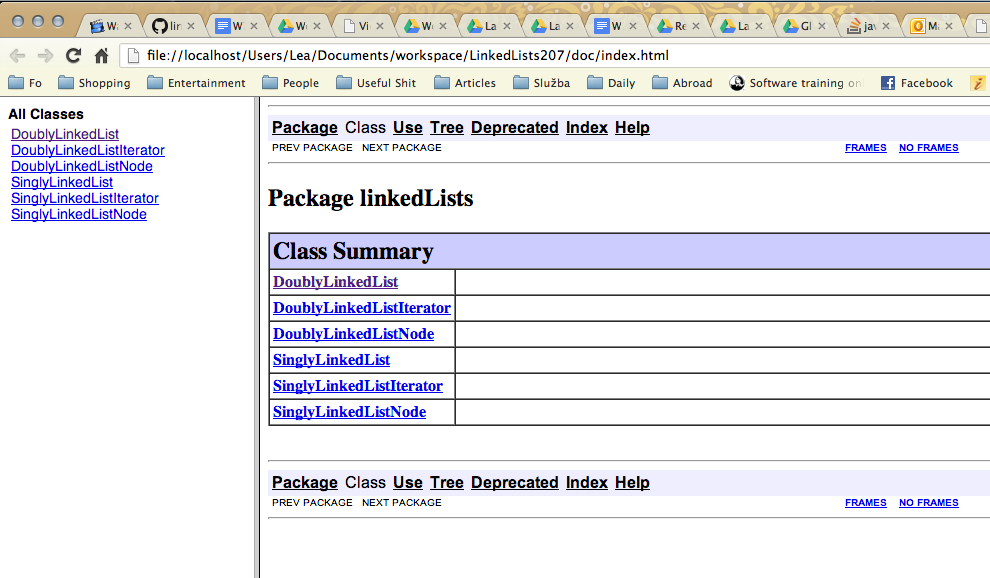
Here's what the documentation for one class looks like.
 |
 |
You'll note that this looks like a less polished version of the Java API, but the skeleton is the same.
Wrapping Up
Important Terms
- Javadoc
- Javadoc tags
- Java API
- Doc comment
Review Questions
- Why do we document our code?
- Who is likely to read our documentation?
- Why is it better to document your code before you implement it?
- Why would one create their own Javadoc tags? What are some tags that you think would be useful?
- How can we automatically generate Doc Comments when we create a class?
Exploratory Questions
- Forthcoming