Mini-Project 2 : Exploring strings
For this project, you will submit one file: string-utils.rkt.
Some background
As our programs get more complicated, the structure of our code and good names and formatting are not enough to make our code readable and correct. We need to rely on extrinsic means to ensure these things. To ensure that our code is readable, we use documentation to capture aspects of our code that are not obvious upon inspection. To ensure that our code is correct, we use tests that codify the correctness our programs through concrete examples.
As you may recall, we recommend a four-step process for developing procedures: Document the procedure, make a list of sample inputs and outputs that will help you determine whether your implementation is correct, write your procedure, and extend your list of sample inputs and outputs.
During our week on software engineering fundamentals, we’ll discuss these concepts in more detail. For now, we’ll employ some basic documentation and testing for our program.
Documentation
For each function that you write in this mini project, include a function comment that captures the types of the function as well as describes its output in a sentence or two. For example, here is a function comment for a function that finds the minimum of three numbers:
;;; (min x y z) -> real?
;;;   x : real?
;;;   y : real?
;;;   z : real?
;;; Returns the minimum of x, y, and z
(define min-of-three
  (lambda (x y z)
    (cond
      [(and (<= x y) (<= x z))
       x]
      [(and (<= y x) (<= y z))
       y]
      [else
       z])))
The function comment is a stylized comment that consists of the following three components:
(min x y z) -> real?: the signature of the function which names its arguments and describes the output type of the function. In Racket, we express the types with the predicate functions that we use in code to test whether an expression has that type. For example, this signature says thatminhas three arguments,x,y, andzand that it produces a real number (as tested by thereal?function).x : real? ...: the types of each of the parameters mentioned in the signature. Like the return type of the function, we document the types of the parameters with the predicates that we would use in code to test values of those types.Returns the minimum of x, y, and z: finally, we include a brief sentence or two description of the behavior and output of the function. Here, the behavior of the function is simple, so we comparatively have little to say: the function returns the minimum of its arguments.
Tests
Up until this point, we have asked you to experiment with the functions that you write in the interactions window to check for correctness. This has the upside of being fast, but if you change your code, you need manually type in all those tests again which is tedious (which in turn makes it less likely you’ll recheck the correctness of your code). A better solution is to codify your tests in your code so that you can rerun the tests at will.
During our unit on software engineering fundamentals, we’ll introduce you to a library, rackunit, that makes test authoring and execution a breeze.
For now, we’ll look at two basic RackUnit procedures
When we are developing predicates (procedures that return a Boolean) value, Racket provides two important procedures to help us make that list of inputs/outputs and automatically check it for us: (test-true DESCRIPTION EXP) and (test-false DESCRIPTION EXP), which evaluate the expression and prints out the description only when the expression does not evaluate to true (false).
For example,
;;; (valid-id? str) -> boolean?
;;;   str : string?
;;; Determines whether str is a valid id in that it is a six-character
;;; string that contains only digits.
(define valid-id?
  (lambda (str)
    (and (string? str)
         (string->number str)
         (= 6 (string-length str)))))
> (test-true "standard id" (valid-id? "123456"))
> (test-true "leading 0's" (valid-id? "000011"))
> (test-false "fewer than six characters" (valid-id? "1234"))
> (test-false "more six characters" (valid-id? "1234567"))
> (test-false "non-digit at end" (valid-id? "12345x"))
> (test-false "begins with dash" (valid-id? "-12345"))
--------------------
begins with dash
. FAILURE
name:       check-false
location:   interactions from an unsaved editor:15:2
params:     '(#t)
--------------------
As you can see, when the test succeeds, we get no output.
When the test fails, we get a large failure notice.
(In this case, the test fails because the valid-id? procedure above is incorrect; it does not correctly reject "-12345".)
We can take advantage of this behavior by putting the tests immediately after our code in the definitions pane.
When we click "Run", we'll see if there are any problems.
If we we see no reports, we can be sure that our code passed all the tests.
To use these procedures, one needs to require the rackunit library with (require rackunit)`.
Setting up your file
You will have one file for this assignment, string-utils.rkt.
Here’s the start of the file.
#lang racket

;; CSC-151-NN (TERM)
;; Mini-Project 2: Exploring Strings
;; YOUR NAME HERE
;; YYYY-MM-DD
;; ACKNOWLEDGEMENTS:
;;   ....

(require csc151)
(require 2htdp/image)
(require rackunit)

(provide (all-defined-out))
That new line will ensure that you can use the string utilities in other programs by writing
(require (file "string-utils.rkt"))
Do not add this new require line to string-utils.rkt.
Part the first: String utilities
This part of the mini-project should take you about ninety minutes.
As you have likely discovered by now, the built-in Racket procedures don’t always imediately do what we want.
For example, although we can use a combination of integer? and string->number to determine if a string contains only digits, we would prefer not to write (integer? (string->number str)) again and again and again, particularly since we might later realize that that solution is not perfect.
When most programmers discover that they need to do the same thing again and again? They create a library of utility procedures that they plan to use in other procedures. Although you are just beginning your experience as a Racket programmer, you will still find it useful to create your own set of utilities.
a. Suppose we are writing a procedure, (all-digits? str), that takes a string as an input and determines if that string contains only digits.
Write six or more tests (including at least two that use test-true and at least two that use test-false) that one could use to determine whether all-digits? is behaving correctly.
Make sure to consider edge cases, such as when the string starts with a plus sign or includes a period.
b. Document and implement all-digits?.
c. Document, write tests for, and implement a procedure, (digit->integer char) that takes a character as input and produces the integer that corresponds to that input. If the input is not a digit character, your procedure should return -1.
> (digit->integer (string-ref "72345" 0))
7
> (digit->integer #\2)
2
> (digit->integer #\a)
-1
d. Document, write tests for, and implement a procedure, (trim str), that takes a string as input, checks whether there is a space at the beginning or a space at the end, and if, so, removes either or both of those spaces. You should only remove one space from the front (if there is one) and one space from the back (if there is one). You may not use the built-in string-trim procedure.
Note: You will likely only write test-true tests for trim, using a form like (test-true (equal? (trim " ") "").
Make sure to check strings with and without spaces.
e. Document, write tests for, and implement a procedure, (remove-spaces str), that takes a string as input and removes any spaces from the string. You may find string-replace or string-split useful.
Note: You will likely only write test-true tests for remove-spaces.
f. Document, write tests for, and implement two more procedures that work with characters or strings and that you expect to be useful.
Part the Second: Dale-Chall Scores
This part of the mini-project should take you about thirty minutes.
There are a number of algorithms for computing the readability of prose. One that we will implement now is the Dale-Chall readability formula:
https://en.wikipedia.org/wiki/Dale%E2%80%93Chall_readability_formula
The formula given in 1948 as:
score = 0.1579 × (PDW × 100) + 0.0496 × ASL
ASL is the “average sentence length”, the total number of words in the text divided by the number of sentences in the text.
PDW is the “percentage of difficult words”, the number of words in the text not found in Dale-Chall’s list of about 3000 familiar words:
http://countwordsworth.com/download/DaleChallEasyWordList.txt
PDW should be a number between 0 and 1. (Most mathematicians and statisticians think of percentages that way.)
The score looks straightforward, but there’s a bit of added complexity. If the percentage of difficult words is above 5% (5/100), then add 3.6365 to the score. If the percentage of difficult words is lower, we keep it as it is.
a. Document and write a procedure, (compute-dale-chall-score num-difficult-words total-words num-sentences), that takes three parameters:
num-difficult-words, the number of difficult words in the texttotal-words, the total number of words in the textnum-sentences, the number of sentences in the text
Your procedure should compute the Dale-Chall score from these statistics. Here is an example execution of the procedure:
> (compute-dale-chall-score 35 200 40)
6.64775
> (compute-dale-chall-score 25 100 18)
7.859555555555556
Experiment with your procedure using a variety of inputs to gain confidence that your procedure is implemented correctly.
This score can be then translated into a grade level for which the text is appropriate. The score-to-grade table from Wikipedia is given below:
4.9 or lower: "4th grade or lower"
5.0–5.9:      "5th-6th grade"
6.0–6.9:      "7th-8th grade"
7.0–7.9:      "9th-10th grade"
8.0–8.9:      "11th-12th grade"
9.0 or above: "13th-15th grade"
You should, of course, deal with the numbers that the table makes unclear. As is normal in our class, please use ranges like 5.0 (inclusive) to 6.0 (exclusive).
less than 5.0:      "4th grade or lower"
5.0 <= score < 6.0: "5th-6th grade"
6.0 <= score < 7.0: "7th-8th grade"
7.0 <= score < 8.0: "9th-10th grade"
8.0 <= score < 9.0: "11th-12th grade"
at least 9.0:       "13th-15th grade"
b. Document and write a procedure, (score->grade score), that takes a Dale-Chall score and returns the grade level corresponding to the range that score falls under.
Your function should return the grade level as the strings given in the above table. For example,
> (score->grade 5.2)
"5th-6th grade"
> (score->grade 11.1)
"13th-15th grade"
> (score->grade 7)
"9th-10th grade"
c. Come up with a two or three short texts that will be useful for exploring Dale-Chall scores, at least once we figure out how to count the number of words in a file. (We’ll use them on the next assignment.) Here’s a too-short sample text.
(define text1 "I am Sam. Sam I am. I say green eggs are glam.")
Part the Third: Visualizing texts
This part of the mini-project should take you about ninety minutes.
One of the ways that digital humanists employ computers is to quickly gather and visualize data from texts. In this part of the assignment, you’ll work on ways to visualize some simple aspects of texts as bar charts.
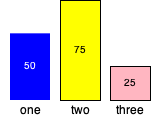
a. Document and write a procedure, (bar-chart height label1 num1 color1 label2 num2 color2 label3 num3 color3) that makes a three column bar chart.
The heights of the three bars depend on num1, num2, and num3.
The height of the bar with the largest number should be height.
The heights of the other two bars should be appropriately proportional to that height.
Each bar should appear in the corresponding color.
The labels should appear below each of the corresponding bars.
The numbers should appear within the bars.
Bars should be 40 units wide.use
Use 12 point font for the labels and 10 point for the numbers.
Remember that you can use (text str size color) to create text in an image.
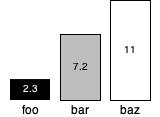
To achieve an E on this part, you should make sure that bars and text are easy to read, no matter what colors the user chooses. If a bar is “light” (white or close to white), it should be outlined in black. If a bar is “dark”, the number should appear in white. If a bar is “light”, the number should appear in black.
Here are some examples.
(bar-chart 100
           "one" 50 'blue
           "two" 75 'yellow
           "three" 25 'lightpink)
(bar-chart 100
           "foo" 2.3 'black
           "bar" 7.2 'gray
           "baz" 11 'white)
How will you determine if a color is light or dark?
You will choose an appropriate threshold based on the red, green, and blue components of the color.
(For the examples, we decided a color is light if the average component is at least 127. You may make a different decision.)
You can use (red-component color), (green-component color), and (blue-component color) to extract those three components.
b. Now let’s use that procedure to explore a text. We’ll start with some utility procedures that you will find useful.
The procedure (count-occurrences str text) counts how many times a string appears in a longer text.
> (count-occurrences "fish" "one fish two fish red fish blue fish")
4
> (count-occurrences "o" "one fish two fish red fish blue fish")
2
> (count-occurrences "three" "one fish two fish red fish blue fish")
0
Given a sufficiently long text, you could provide a quick comparison of three words.
(bar-chart 100
           "him" (count-occurrences " him " text) "pink"
           "her" (count-occurrences " her " text) "blue"
           "their" (count-occurrences " their " text) "purple")
You’ll note that we put spaces around the words so that we don’t accidentally count a word like “where” when matching “her”. It is not a perfect strategy, as we will miss occurrences at the start or end of a line. But we’ll deal with that issue another day.
Before we go on, we need a longer text for that process to be interesting.
The procedure (file->string filename) reads from a file in the filesystem (preferably in the same directory) and returns it as a string.
We’ll use pg1260.txt, which contains the Project Gutenberg version of Jane Eyre.
> (define jane-eyre (file->string "pg1260.txt"))
Note that we do not want to print out the contents of Jane Eyre directly on the screen. Why not? Because it will take a long time. But we can check parts of it.
> (substring jane-eyre 0 200)
"\uFEFFThe Project Gutenberg eBook, Jane Eyre, by Charlotte Bronte, Illustrated\r\nby F. H. Townsend\r\n\r\n\r\nThis eBook is for the use of anyone anywhere at no cost and with\r\nalmost no restrictions whatsoever.  "

> (substring jane-eyre 5000 5200)
"ntator on his writings has yet found the comparison that\r\nsuits him, the terms which rightly characterise his talent.  They say he\r\nis like Fielding: they talk of his wit, humour, comic powers.  He\r\nr"
Whoops! There are some strange characters there.
The \r\n represents a carriage return and a newline.
The \uFEFF is a strange hidden character that you can ignore.
Now that we have a longer text, we can run the analysis above.
(bar-chart 100
           "him" (count-occurrences " him " jane-eyre) "pink"
           "her" (count-occurrences " her " jane-eyre) "blue"
           "their" (count-occurrences " their " jane-eyre) "purple")
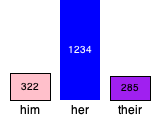
Unsurprisingly, the pronoun “her” dominates in Jane Eyre.
What should you do with all of this? You can generalize the analysis we just did.
Document and write a procedure, (visually-compare word1 word2 word3 text), that takes three words and a longer text (e.g, the result of file->string) as input, and provides a visual comparison of how often each of the three words appear.
You may choose the colors for the bars and the height of the chart.
Note that you will find it difficult to write tests for this part of the assignment. Rather, you should conduct experiments to make sure that you get approximately the right picture at each stage.
Submitting your work
Put your work in a file called string-utils.rkt.
Make sure to put the tests after the procedures you are testing.
Make sure to organize the file so that it’s easy for another human (e.g., your professor, mentors, or graders) to read it.
Turn in your completed files to Gradescope. Try to resolve any issues that the autograder describes.
Questions & Answers
About tests
Why are we writing tests?
It’s good to think about what output you expect for various inputs.
It’s one way to check whether your code is correct.
Will we learn more about tests soon?
Yes. Probably next week.
Should we write greater-than signs before our tests?
No.
What should happen if our code passes all of our tests?
You should not see any failure messages in the interactions pane when you click Run.
What should happen if our code fails a test?
You should see a failure message in the interactions pane when you click Run.
Part Two
Why are we writing sample texts in Part 2c?
In the next assignment, you will be responsible for counting words, difficult words, and sentences in a text. We’d like you to have a variety of sample texts to work with. You might try for a text that you expect to have a low score (easy to read) and one that you expect to have a high score (harder to read).
How long should those sample texts be?
Somewhere between one paragraph and one page.
Part Three
Can I have a hint as to how to color the text differently?
Sure. The following will write
"x"in black ifcoloris bright (determined by a fictitiousbright?procedure) and in white ifcoloris dark.
(text "x"
      12
      (if (bright? color)
          'black
          'white))
Wait! Can we really nest things like that?
That’s one of the key ideas in Scheme. You should be able to use most expression in any situation in which a value is called for.
Miscellaneous
Can we submit incomplete code to see what the autograder says?
Sure. The autograder is there primarily to help you think about issues you might have missed.
Will you try to put most of the questions on MP2 in this section?
Yes.
Partial rubric
In grading these assignment, we will look for the following for each level. We may also identify other characteristics that move your work between levels.
This rubric will be updated closer to the due date.
Redo or above
Submissions that lack any of these characteristics will get an I.
[ ] Passes all of the one-star autograder tests.
[ ] Includes the specified file.
[ ] Includes an appropriate header on the file that indicates the
    course, author, etc.
[ ] Code runs in DrRacket.
[ ] Documentation for most procedures.
Meets expectations or above
Submissions that lack any of these characteristics but have all of the prior characteristics will get an R.
[ ] Passes all of the two-star autograder tests.
[ ] All procedures in part one include tests.
[ ] Code is well-formatted with appropriate names and indentation.
[ ] All procedures documented, generally correctly.
[ ] Code has been reformatted with Ctrl-I before submitting.
[ ] Documentation for most procedures is correct / has the correct form.
[ ] Includes two sample texts for future Dale-Chall analysis.
Exemplary / Exceeds expectations
Submissions that lack any of these characteristics but have all of the prior characteristics will get an M.
[ ] Passes all of the three-star autograder tests.
[ ] The extra procedures in part one are particularly creative or useful.
[ ] In computing the Dale-Chall score, avoids repeated computation.
[ ] In the bar charts, adds outlines to light bars.
[ ] In the bar chars, uses dark text for light bars and light text for dark bars.
[ ] The `bar-chart` procedure is decomposed into appropriate subprocedures.
[ ] No "magic numbers", such as 48.
[ ] Avoids repeated work.
[ ] Tests include well-designed "edge cases".
[ ] Documentation for all procedures is correct / has the correct form.