Laboratory: Drawings as Values
This lab is newly re-written for Fall 2015. Expect a few bugs and too many exercises.
Summary: In this laboratory, you will explore the model of images in which images are created by composing and modifying basic drawing objects.
Exercises
Exercise 1: A Simple Drawing
In the first self check, we created a complex drawing step-by-step, defining each intermediate drawing along the way. However, if we're drawing a single shape, we could also nest operations.
a. Write a single definition that creates a blue circle of radius
30, centered at (80,40). Name that circle blue-circle.
(define blue-circle
  ___)
b. Display the new drawing in a 100x100 image to see that you created it successfully.
>(image-show (drawing->image blue-circle 100 100))
c. What do you expect the underlying representation to look like? Fill in the blanks below.
'(drawing ellipse 255 "" ___ ___ ___ ___)
d. Check your answer experimentally.
>blue-circle
Exercise 2: Scaling Drawings
Consider the following definition.
(define sample-square
 (recolor-drawing
  "green"
  (hshift-drawing
   60
   (vshift-drawing
    100
    (scale-drawing
     40
     drawing-unit-square)))))
a. In English, describe what shape you think this describes.
b. Check your answer experimentally by displaying the drawing.
c. Where is the left margin of the square? Where is the top margin?
(Note that you can identify these margins visually or you can
use drawing-left and drawing-top
to have the computer identify them.)
d. Now, suppose we define a new drawing by scaling the square.
(define sample2 (scale-drawing 1.5 sample-square))
Describe what you expect the result to look like.
e. Check your answer experimentally.
f. Where is the left margin of the scaled square? Where is the top margin? Were they what you expected? Why do you think they are what they are?
g. Now, suppose we define a new drawing by scaling the square in only one direction.
(define sample3 (hscale-drawing 0.75 sample2))
Describe what you expect the result to look like.
h. Check your answer experimentally.
Exercise 3: Order of Operations
As you know, when we're working with mathematics, the order in which we apply operations matters a lot. For example, if we both add two to and square a number, it matters whether we add first or square first. Does order matter in drawings? Let's consider a few examples. (Note: We explore the examples visually. You may also find it useful to see what the underlying representations look like.)
We'll start with a simple black circle along with copies of it colored red and blue.
(define subject (scale-drawing 40 drawing-unit-circle))
(define subject-red (recolor-drawing "red" subject))
(define subject-blue (recolor-drawing "blue" subject))
a. Suppose we want to translate the circle horizontally 30 units and vertically 30 units. Do you think the order we do those two operations matters? Why or why not?
b. Use the following code to check your answer. What do you expect it to do? Does it do what you expect?
(image-show
 (drawing->image
  (drawing-group subject
                 (hshift-drawing 40 (vshift-drawing 50 subject-red))
                 (vshift-drawing 50 (hshift-drawing 40 subject-blue)))
  100 100))
c. Suppose we want to scale the circle horizontally by 1/2 and vertically by 3/2. Do you think the order we do those two operations matters? Why or why not?
d. Use the following code to check your answer.
(image-show
 (drawing->image
  (drawing-group subject
                 (hscale-drawing 0.5 (vscale-drawing 1.5 subject-red))
                 (vscale-drawing 1.5 (hscale-drawing 0.5 subject-blue)))
  100 100))
e. Suppose we want to translate the circle horizontally by 50 units and scale it by 1/2. Do you think the order we do those two operations matters? Why or why not?
f. Use the following code to check your answer.
(image-show
 (drawing->image
  (drawing-group subject
                 (hshift-drawing 40 (scale-drawing 0.5 subject-red))
                 (scale-drawing 0.5 (hshift-drawing 40 subject-blue)))
  100 100))
Exercise 4: Drawing Squares
Now that we can draw circles using
circle
How do we create a drawing of a square? It depends on how we want to describe the square. If we are centering the square on a particular point, we need to know (1) the x coordinate of the center, (2) the y coordinate of the center, and (3) the edge length of the square. We can then scale the unit square by the edge length and shift it horizontally by the x coordinate of the center and vertically by the y coordinate of the center. Suppose we are drawing a square with edge length 25, centered at (20,30). We might write
(define my-square
  (hshift-drawing
   20
   (vshift-drawing
    30
    (scale-drawing 25 drawing-unit-square))))
Now, let's think about how to generalize this.
a. Write a procedure, (
that creates a drawing of a square. (We couldn't call this procedure
centered-square
edge-length center-x
center-y)squarecircle procedure.
b. However, most of us don't like to draw our squares centered on a particular point. We'd rather specify the left edge and the top edge. How can we do that? Suppose we want to draw a square of side-length 30, with the left edge at 17 and the top edge at 42. We first scale the unit square by 30. That means that the left edge, which was at -1/2, is now at -15 (that is, -1/2 * 30). The top edge, similarly, is also at -15. To get the left edge at 17, we need to shift it horizontally by 32 (that is, 15 + 17). To get the top edge at 42, we need to shift it vertically by 59 (that is, 15 + 42).
In Scheme, we might write
(define another-square
  (hshift-drawing
   (+ (/ 30 2) 17)
   (vshift-drawing
    (+ (/ 30 2) 42)
    (scale-drawing 30 drawing-unit-square)))
Of course, we can also generalize this code.
Write a procedure ( that creates a drawing of a square of the
specified edge length, with the left side of the square at
drawing-of-square
edge-length left
top)left and the top side at top.
Exercise 5: Drawing Circles, Revisited
One deficiency of the my-circlecentered-square and
drawing-of-square procedures you've just written
is that they don't allow you to specify the color of
the circle or square.
Rewrite the my-circle

(my-circle 20 10 10 "blue")
Exercise 6: Drawing Rectangles
Write a procedure, rectangle

(rectangle 20 10 50 80 "yellow")
If you'd like to know what we thought were appropriate parameters, you can look at the notes on this exercise.
Exercise 7: Fun with Neighbors
As you may recall, the add-right-neighbor
a. Write a procedure,
( that combines a drawing with
a duplicate neighbor that is 75% of the size of the original drawing.
add-smaller-right-neighbor
drawing)

(add-smaller-right-neighbor red-eye)
As you write this procedure, you will find it useful to examine the
code for add-right-neighbor
b. Write a procedure, add-nearer-right-neighbor drawing)
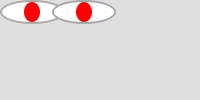
(add-nearer-right-neighbor red-eye)
Exercise 8: Combining Transformations
We now have procedures that pair an image with a smaller right neighbor and a nearer right neighbor. What happens if we combine these transformations? For each of the following, predict what the image will look like and then render it to check your prediction.
a. (add-smaller-right-neighbor (add-nearer-right-neighbor red-eye))
b. (add-nearer-right-neighbor (add-smaller-right-neighbor red-eye))
c. (add-smaller-right-neighbor (add-smaller-right-neighbor red-eye))
For Those With Extra Time
If you have extra time, you may find it useful to do any of the following exercises. (You need not do them in order.) You may also choose to do one of the explorations.
Extra 1: Rendering Drawings
For each of the procedures above, you've likely tested your procedure by applying it to some drawing, rendering that drawing to some image, and then showing the image. For example,
>(image-show (drawing->image (rectangle 20 10 50 80) 200 100))
Write a procedure, ( that renders the drawing on
a "large enough" image, then shows the image. Once we've written
that procedure, we can more easily check drawings, as in the
following.
check-drawing
drawing)
>(check-drawing (rectangle 20 10 50 80))
How can we find out how large the image needs to be? We can
ask a drawing where its lower right hand corner is using the
drawing-bottom and
drawing-right procedures.
Extra 2: Drawing Eyes
In the reading, we defined a drawing that looks a bit like a red eye.
Write your own procedure, drawing-eye, that
builds a drawing of an eye, based on the values of its parameters.
What parameters should it have? Certainly, the color of the iris.
However, you might find other parameters useful, too.
Extra 3: An Alternate Scaling Mechanism
As you may recall, one potentially confusing aspect of the
scale-drawing
Write a procedure, (, that scales a drawing, but
does not move the drawing. That is, the scaled drawing has the
same left edge and the same top edge as the original drawing.
alternate-scale
amt
drawing)
If you're not sure how to approach this problem, you may want to read the notes on this exercise.
Extra 4: Grids of Images
a. Write a procedure, ( that creates a compound
drawing with four copies of drawing (one shifted right, one
shifted down, and one shifted down and right).
two-by-two
drawing)
b. Write a procedure that takes the result of
two-by-two and scales it by 50%, so that
the resulting drawing is the same width and height as the original.
c. Using this new procedure, build a four-by-four grid of one of the original images, or one of your own choosing.
Explorations
For some of these explorations, you may find the following drawing an appropriate starting point. You might also start with a house or other drawing you've designed. You might even start with a simple shape.
(define sample
  (hshift-drawing
   50
   (vshift-drawing
    50
    (drawing-group
     (scale-drawing
      100
      drawing-unit-circle)
     (scale-drawing
      90
      (recolor-drawing "yellow" drawing-unit-circle))
     (vshift-drawing
      10
      (hscale-drawing
       60
       (vscale-drawing
        40
        drawing-unit-circle)))
     (hscale-drawing
      60
      (vscale-drawing
       40
       (recolor-drawing "yellow" drawing-unit-circle)))
     (vshift-drawing
      -15
      (drawing-group
       (hshift-drawing
        18
        (drawing-group
         (hscale-drawing
          30
          (vscale-drawing
           15
           (recolor-drawing "white" drawing-unit-circle)))
         (hscale-drawing
          15
          (vscale-drawing
           15
           (recolor-drawing "blue" drawing-unit-circle)))))
       (hshift-drawing
        -18
        (drawing-group
         (hscale-drawing
          30
          (vscale-drawing
           15
           (recolor-drawing "white" drawing-unit-circle)))
         (hscale-drawing
          15
          (vscale-drawing
           15
           (recolor-drawing "green" drawing-unit-circle)))))))))))
Exploration 1: Simple Pictures
Try using the drawing procedures to create a smiley face or an office building.
Exploration 2: Multiple Neighbors
In Extra 4, each of the expressions takes one drawing and turn it into four drawings. Explore other ways to use this kind of replication to build an interesting image. (You might also think about ways to create eight, sixteen, or even more copies of the image.)
Exploration 3: More Interesting Neighbors
In Exercise 7, you developed a number of procedures that pair an image with a neighbor. Create a few variants of those procedures that change the neighbor in an “interesting” way. For example, you might scale it differently horizontally and vertically, you might have it overlap the original figure, you might shift it both horizontally and vertically.
Notes on the Exercises
Notes on Exercise 6: Drawing Rectangles
We would recommend that your procedure have the form
(define rectangle
  (lambda (left top width height color)
    ..._))
Notes on Extra 3: An Alternate Scaling Mechanism
The alternate scaling algorithm is fairly straightforward:
- Shift the drawing back to the origin. (The top and left should both be 0.)
- Scale the shifted drawing.
- Shift the scaled drawing back to the original place. (The top and left should match the top and left of the original drawing.)