Assignment 5: Drawing with Conditionals and Anonymous Procedures
Due: 10:30 p.m., 1 March 2016
Summary: In this assignment, you will use anonymous procedures and conditionals to generate interesting drawings with repeating patterns.
Purposes: To further practice building drawings programmatically, this time using conditionals and anonymous procedures to produce drawings with interesting patterns.
Collaboration: You must work with your assigned partners on this assignment. You must collaborate on every problem - do not break up the work so that one person works on problem 1, another on problem 2, and another on problem 3. (The “don't break up the work” policy applies to every assignment. This note is just a reminder.) You may discuss this assignment with anyone, provided you credit such discussions when you submit the assignment.
Wrapper (Prologue): Individually read through this assignment and make sure that you understand what is required. Then use the form available at http://bit.ly/151hw5pro to indicate (a) how long you think this assignment will take and (b) what you think will be the most challenging aspect of this assignment.
Wrapper (Epilogue): When you are done with the assignment, fill out the form available at http://bit.ly/151hw5epi to indicate (a) how long the assignment took, (b) what the most challenging part of the assignment was, and (c) something important you learned from doing the assignment. If you find that the assignment took much less or much more time than you expected, also include (d) a note as to what might have led to that difference.
Submitting: Send your answer to
<CSC151-02-grader@grinnell.edu>. The title of your email should have the
form CSC 151.02 Assignment 5: Conditionals and should contain
your answers to all parts of the assignment. I prefer that you put
your answers in the body of the message, rather than as an attachment.
So that this assignment is a learning experience for everyone, we may spend class time publicly critiquing your work.
Assignment
Problem 1: Drawing Stripes
Write and document a procedure (make-stripes num color1 color2) that draws num horizontal stripes alternating between colors color and color2. This procedure should produce a drawing composed of one pixel wide, one pixel tall unit squares with the upper left corner at 0,0 and the lower right corner at 1,num.
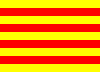
Scaling the result of your make-stripes procedure allows you to produce stripes of any height and width. One possible use of this procedure is to draw the Catalan flag with the following code:
(image-show
 (drawing->image
  (hscale-drawing
   100
   (vscale-drawing
    8
    (make-stripes 9 "yellow" "red"))) 100 72))
Problem 2: Drawing Graphs
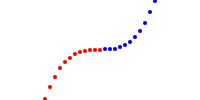
Write and document a procedure (make-plot fun) that produces a drawing of a function fun over a range of x values from 0 to 200, and y values from -50 to 50. Your make-plot procedure should plot at least 20 different points for the function between x values of 0 and 200. For each point, compute a y value with (fun x-value) and place a small circle in the image. A y value of -50 should be at the bottom of your drawing, and a y value of 50 should be at the top. Color each point blue if the y value is positive and red if the y value is negative.
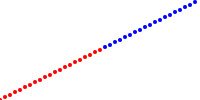
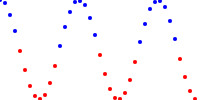
Here are a few example plots that may help you test your make-plot procedure:
(image-show (drawing->image (make-plot (lambda (x) (- (/ x 2) 50))) 200 100))
(image-show (drawing->image (make-plot (lambda (x) (* 50 (cos (/ x (* 4 pi)))))) 200 100))
(image-show (drawing->image (make-plot (lambda (x) (expt (/ (- x 100) 15) 3))) 200 100))
Problem 3: Sampling Images
Recall that ( allows you to alter an image pixel-by-pixel, where image-variant color-transform)color-transform
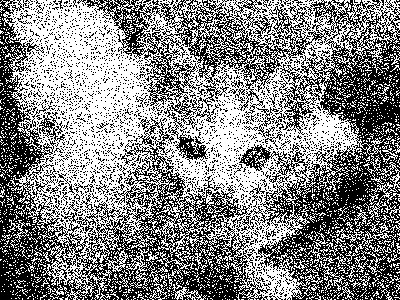
a. Write and document a procedure, (, that takes in a color and returns either black or white.
This procedure should pick randomly between black and white, but be biased toward white if speckle-greyscale color)colorcolor
The function ( will give you an unpredictable number
between 0 and random
n)n-1, inclusive.
The expression (= (random 2) 1) would simulate a fair coin toss, where each time this expression is evaluated you have equal odds of getting #t and #f.
However, the expression (< (random 10) 3) will produce #t only 30% of the time.
Here is an example image produced using this procedure:
> (image-show (image-variant (image-load "/home/rebelsky/kitten.jpg") speckle-greyscale))
You may also find the ( procedure you wrote in the Writing Your Own Procedures Lab useful when implementing this procedure.
irgb-luma color)
b. Write a document a procedure, (, that takes in a color and returns one of the following eight colors:
speckle color)(irgb 0 0 0),
(irgb 255 0 0),
(irgb 0 255 0),
(irgb 0 0 255),
(irgb 255 255 0),
(irgb 255 0 255),
(irgb 0 255 255), or
(irgb 255 255 255).
As with the greyscale version in part a, you should choose colors using a biased "coin flip," but this time you will choose each component independently.
For example, if the red component of color is 96, there should be a 96 in 256 chance that (speckle color) will return a color with a red component of 255 and a 160 in 256 chance that it will return a color with a red component of zero.
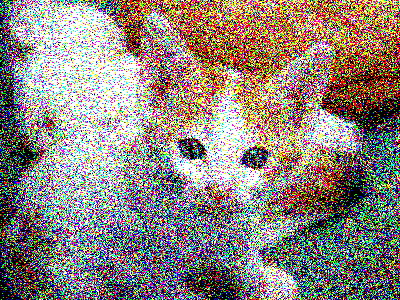
Here is an example image produced using this procedure:
> (image-show (image-variant (image-load "/home/rebelsky/kitten.jpg") speckle))