Assignment 3: Color Transformations and Image Filters
Due: 10:30 p.m., 9 February 2016
Summary: In this assignment, you will explore mechanisms for transforming colors and see how those mechanisms can then be applied to images. Our primary focus is on color transformations.
Purposes: To give you more experience with colors and color transformations. To give you more experience writing your own functions. To have a bit of fun.
Collaboration: You must work with assigned partners on this assignment. You may discuss this assignment with anyone, provided you credit such discussions when you submit the assignment.
Submitting:
Email your answer to <CSC151-02-grader@grinnell.edu>. The title of your
email should have the form CSC 151.02 Assignment 3: Color Filters
and should contain your answers to all parts of the assignment.
Scheme code should be in the body of the message. You should not
attach any images; we should be able to re-create them from your code.
Warning: So that this assignment is a learning experience for everyone, we may spend class time publicly critiquing your work.
Background
You have recently begun to explore the RGB color model as well as
functions that transform RGB colors. You have seen a wide variety
of built-in color transformations, including
irgb-complement, irgb-lighter,
and irgb-redder. You have also started to
might write your own color transformations. You have learned a
variety of mechanisms for writing color transformations.
-
You can use the composition operator,
to combine other
unary transformations into a single transformation. For example,
you might write a procedure that cuts the high components with
the following code.
(define irgb-limit-high (compose irgb-darker irgb-darker irgb-lighter irgb-lighter))
-
You can use the
section(define irgb-decrease-red (section irgb-subtract <> (irgb 64 0 0)))
-
You can use a generalized lambda expression to write your
transformation, using a pattern something like the following.
(define irgb-transform
  (lambda (color)
    (irgb (function-to-compute-new-red-component color)
          (function-to-compute-new-green-component color)
          (function-to-compute-new-blue-component color))))
For example, to decrease each of the components by 32, you might write:(define irgb-subtract-32 (lambda (color) (irgb (- (irgb-red color) 32) (- (irgb-green color) 32) (- (irgb-blue color) 32))))
As you may have noted, by using image-variant and
a color transformation, we have effectively written a simple image
filter, akin to those that come with Adobe Photoshop and other
image editing applications.
In this assignment, you will build some color transformations and explore their utility as image filters.
Assignment
Problem 1: Limited Components
Write a procedure, (, that takes one parameter,
an integer-encoded RGB color, and turns each component to 192 if it is
at least 128 and to 64 if it is less than 128. (192 is about
the midpoint of the range 128 ... 255; 64 is about the midpoint of the
range 0 ... 127.)
irgb-limit
color)
>(irgb->string (irgb-limit (irgb 0 64 200)))"64/64/192">(irgb->string (irgb-limit (irgb 128 130 0)))"192/192/64"
Note: Since you have not yet learned if,
you may not use if expressions.
Hint: A hint for this problem may appear in a recent lab.
Hint: You will likely find it easier if you write a series of helper procedures that solve parts of the problem.
Problem 2: Minimal Components
Write a procedure, (, that takes one parameter,
an integer-encoded RGB color, and produces a new color in which
each component is 0 if it is the smallest component (or tied for
smallest) and 255 otherwise.
irgb-minimal-component
color)
>(irgb->string (irgb-minimal-component (irgb 0 5 0)))"0/255/0">(irgb->string (irgb-minimal-component (irgb 200 199 199)))"255/0/0">(irgb->string (irgb-minimal-component (irgb 10 0 10)))"255/0/255">(irgb->string (irgb-minimal-component (irgb 10 10 10)))"0/0/0"
Hint: You should be able to do this with a clever
combination of max
Hint: Once again, you may find it helpful to write some helper procedures.
Problem 3: Flattening
A common common technique for manipulating images is known as “flattening” the image. In general, we flatten an image by choosing a set of evenly spaced values for components, with the first value half of the spacing. For example, we might ensure that the components are 16, 48, 70, (evenly spaced by 32, starting at 16) or 32, 96, 160, ... (evenly spaced by 64, starting at 32).
How do we convert each component to the appropriate value? Consider the case in which we space values by 32. If we divide the component by 32, compute the floor, and then multiply by 32, we'll get the next lowest multiple of 32. For example,
>(* 32 (floor (/ 11 32)))0>(* 32 (floor (/ 21 32)))0>(* 32 (floor (/ 33 32)))32>(* 32 (floor (/ 71 32)))64>(* 32 (floor (/ 99 32)))96
Once we have the multiple of 32, we add the starting point.
>(+ 16 (* 32 (floor (/ 33 32))))48
Write a procedure,
(, that flattens an integer-encoded RGB color by converting each
component to a value using a spacing of 64.
irgb-flatten-64 irgb-color)
- If the component is between 0 and 63, it becomes 32.
- If the compnent is between 64 and 127, in becomes 96.
- If the compnent is between 128 and 191, it becomes 160.
- If the component is between 192 and 255, it becomes 224.
You may then want to see the effect this procedure has on various images.
>(define kitten (image-load "/home/rebelsky/Desktop/kitten.jpg"))>(image-show kitten)>(image-show (image-variant kitten irgb-flatten-64))
Hint: The sample code for computing nearest multiples of 32 should help.
Problem 4: Cycling Through Colors
As you've seen, when we apply the typical color transformation, such
as irgb-darker or irgb-redder,
we eventually reach a limit of 0 or 255. But we can get some interesting
effects by “wrapping around” at the end. For example, here's
the output from a function that adds 64 to a number, wrapping when we hit
255.
> (cyclic-add-64 50)
114 ; 50 + 64 = 114
> (cyclic-add-64 180)
244 ; 180 + 64 = 244
> (cyclic-add-64 192)
0 ; 192 + 64 = 0, we wrap around to 0
> (cyclic-add-64 220)
28 ; 220 + 64 = 284.  284 - 256 = 28
As you might expect, cyclic-add-64
(define cyclic-add-64
  (lambda (val)
    (remainder (+ val 64) 256)))
(define cyclic-add-64 (compose (section remainder <> 256) (section + <> 64)))
Write a procedure, (,
that takes one color as input and produces a new color formed by
the cyclic addition of each component to itself.
colors.
irgb-cyclic-double
color)
Problem 5: Averaging Colors
You've already seen the (
procedure, which averages two colors. But what if we want a
“weighted” average, in which one color contributes
more to the average than the other? Let's say we want the first
color to count twice as much as the other (so the first accounts
for 2/3 of the result, and the other color accounts for one-third).
Write a procedure, irgb-average
color1 color2)irgb-average-2-to-1
>(irgb->string (irgb-average (irgb 60 90 120) (irgb 0 0 0)))"30/45/60">(irgb->string (irgb-average-2-to-1 (irgb 60 90 120) (irgb 0 0 0)))"40/60/80">(irgb->string (irgb-average-2-to-1 (irgb 0 0 0) (irgb 60 90 120)))"20/30/40">(irgb->string (irgb-average-2-to-1 (irgb 50 100 150) (irgb 200 150 100)))"100/116/133"
Write irgb-average-2-to-1
Problem 6: HSV Transforms
As we learned in the reading on design and color representing colors in terms of hue, saturation, and value is an alternative to RGB representation. Hue represents the pure color (e.g., red, blue, yellow, green, or a combination of one of these). Saturation represents the “colorfulness” of the hue in the color. For instance, a completely saturated color would be a pure hue (like red), while a less saturated color might appear just as bright but somewhat faded (perhaps rose or pink). Value represents the brightness or darkness of the color.
As shown below, hue is represented as an angle, or a point on a circle. Thus, the values 0-360 sweep through colors red (0 degrees), yellow (60 degrees), green (120 degrees), cyan (180 degrees), blue (240 degrees), magenta (300 degrees), and back to red (at 360 or 0 degrees).
Being able to manipulate the hue in a color can actually be quite
useful. Fortunately, Mediascheme can convert between
HSV colors and integer-encoded RGB colors. We convert from HSV to
RGB with the procedure (, where
hsv->irgb
hsv-color)hsv-color is created using the
hsv(
or hsv->irgb (hsv 300 1/2 1/4))(.
hsv->irgb (hsv 300 .5 .25))
Mediascheme can also extract the, hue, saturation, and value from an RGB
color with the procedures
(
irgb->hue
irgb-color)(
and irgb->saturation
irgb-color)(.
irgb->value
irgb-color)
a. Write a procedure, (, that
takes an integer-encoded RGB color and a hue value (in the range 0-360) as
parameters and creates
a new integer-encoded RGB color using the given hue with the saturation
and value of irgb-change-hue
irgb-color hue)irgb-color.
b. Write a procedure, ( that
finds the true complement of
irgb-true-complement
irgb-color)irgb-color, one that is 180 degrees away on
the color wheel but with the same saturation and value.
c. Write a procedure, (,
that takes an integer-encoded RGB color and a value (in the
range 0-1) as parameters and creates a new integer-encoded
RGB color using the given value with the hue and saturation of
irgb-change-value
irgb-color value)irgb-color.
Problem 7: Hue-Based Transforms
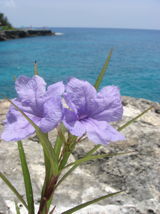
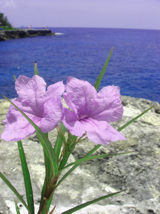
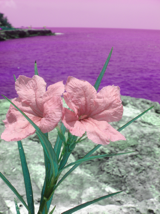
Color transformations based on hue be can visually interesting.
|
|
|
| Original Image | Hue rotated 30 deg | Hue rotated 90 deg |
Write a procedure
(
that takes an integer-encoded RGB color and an angle as parameters
and produces a new integer-encoded RGB color where the HSV equivalent
has a hue rotated by irgb-rotate-hue irgb-color angle)angle degrees, a number
between 0-360.
Hint: If the rotated angle is greater than 360,
be sure to wrap around properly (e.g.,
using remainder) to get the correct hue angle.
Warning: When you
apply irgb-rotate-hue thousands of times (as you
will in an image of non-trivial size), it is likely to take some
time. If you conduct experiments during development, do those
experiments on small images.
Important Evaluation Criteria
We will judge your solutions on their correctness, concision, and cleverness.
Extra Credit: Extracting the Hue
Those of you who want a particularly challenging extra credit problem can consider how you might compute the hue of an RGB colors. We'll provide some information, but not all of the details.
Before we describe how to calculate hue, we need some basic values
to refer to. Let
red, green, and
blue)
refer to the red, green, and blue components of an RGB color,
respectively. The chroma of a color is the
largest of the RGB components minus the smallest of the RGB
components. For example, the chroma of (128,64,50) is 128-50, or 78;
the chroma of (0,255,0) is 255-0, or 255. The chroma of
(255,255,255) is 255-255, or 0.
The raw hue can then be calculated as follows:
-
The raw hue is (
green-blue)/chromawhenredis a largest component. -
The raw hue is 2 + (
blue-red)/chromawhengreenis a largest component. -
The raw hue is 4 + (
red-green)/chromawhenblueis a largest component. -
The raw hue is undefined if
chroma=0. That makes sense, because when all the components are the same we would have a gray, which has no color. (It's also hard to do the above formulae, since they divide by the chroma.) In this case, one convention is to set the raw hue to 0.
Note that the numerators of the fractions make some intuitive
sense. For example, if the red component is largest, and the green
component is larger than the blue component, then we should move
counter-clockwise (positive), toward green. And, as we'd hope, the
(green-blue) is positive.
Similarly, if the red component is largest and the blue component is
larger than the green component, then we should move counter-clockwise
(negative), toward blue. And, as we'd hope, the
(green-blue) is negative.
The raw hue as given above produces a value between -1 and 6 (corresponding to the 6 cardinal colors described above). Why would we end up with a negative number? Well, we just saw that colors in which red dominates that have a larger blue component shift by a negative value.
If the raw hue is negative, we should add 6 to get us back to a positive representation.
The final result is converted to the range 0-359 by multiplying by 60 degrees (which is 360/6).
What do we do if two components are equal and larger than the third? It turns out that the formulae are designed so that you can use any of them. You could also use the appropriate pair and average their final results. For example, if both red and blue are 200 and green is 100, the first formula gives us (100-200)/100 = -1 and the second formula gives us 4+(200-100)/100 = 5. When we add 6 to the -1, both formulae give us 5. We multiply by 60, and get 300.
Now that you know how to compute a hue, it's time to think about code.
The informal algorithm above has a lot of conditionals. But you don't
know how to write conditionals. That's okay; we've found that we can
do without conditionals and still get conditional-like behavior.
For example, (min top (max bottom val)) computes a value
that is equal to bottom, if val is less than bottom; equal to top, if
value is greater than top; and just val, if val is between bottom and top.
Similarly, in a problem above, you wrote code to convert a number to 0
if it was less than 128 and to 255 if it was at least 128.
Implement a procedure, ( that computes the hue of an
RGB color using this strategy. You may not use conditionals in this
computation, nor may you use rgb2hue
color)irgb->hue
Acknowledgments
The HSV hexagon is adapted from an original by Jacob Rus. Both the original and our version are licensed under the Creative Commons Attribution-Share Alike 3.0 Unported license.
The image of flowers was provided to us by Prof. Weinman and used with his permission.