Assignment 8: Trees
Due: 10:30 p.m, Tuesday, 12 November 2013
Summary: In this assignment, you will experiment with the creation and analysis of color trees.
Purposes: To give you more experience working with trees. To give you experience analyzing procedures.
Collaboration: We encourage you to work in groups of size three. You may, however, work alone or work in a group of size two or size four. You may discuss this assignment with anyone, provided you credit such discussions when you submit the assignment.
Wrapper (Prologue): Individually read through this assignment and make sure that you understand what is required. Then use the form available at http://bit.ly/151hw8pro to indicate (a) how long you think this assignment will take and (b) what you think will be the most challenging aspect of this assignment.
Wrapper (Epilogue): When you are done with the assignment, fill out the form available at http://bit.ly/151hw8epi to indicate (a) how long the assignment took, (b) what the most challenging part of the assignment was, and (c) something important you learned from doing the assignment. If you find that the assignment took much less or much more time than you expected, also include (d) a note as to what might have led to that difference.
Submitting:
Email your answer to <grader-151-02@cs.grinnell.edu>. The title of your email
should have the form CSC 151.02 Assignment 8: Color Trees and
should contain your answers to all parts of the assignment. Scheme code
should be in the body of the message.
Warning: So that this assignment is a learning experience for everyone, we may spend class time publicly critiquing your work.
Preliminaries
In exploring trees, it is always useful to be able to find the size or depth of a tree.
;;; Procedure:
;;;   tree-depth
;;; Parameters:
;;;   tree, a tree
;;; Purpose:
;;;   Computes the length of the longest path from the start of the tree
;;;   to the furthest value.
;;; Produces:
;;;   dep, a nonnegative integer
;;; Preconditions:
;;;   None.
;;; Postconditions:
;;;   If tree contains no pairs, then dep is 0.
;;;   Otherwise, dep is one more than the depth of the deepest subtree.
(define tree-depth
  (lambda (tree)
    (if (pair? tree)
        (+ 1 (max (tree-depth (car tree))
                  (tree-depth (cdr tree))))
        0)))

;;; Procedure:
;;;   tree-size
;;; Parameters:
;;;   tree, a tree
;;; Purpose:
;;;   Count the number of values in tree.
;;; Produces:
;;;   count, a non-negative integer
;;; Preconditions:
;;;   (none)
;;; Postconditions:
;;;   count is the number of values in tree.  (pairs are not considered
;;;   values but null is considered a value).
(define tree-size
  (lambda (tree)
    (if (pair? tree)
        (+ (tree-size (car tree))
           (tree-size (cdr tree)))
        1)))
In this assignment, we'll be emphasizing color trees, which means that we'll want a way to visualize them. You've already seen one technique for rendering color trees, in which we recursively divide the image in half vertically and render each half of the color tree in the corresponding half of the image. Here is a slightly different rendering technique that alternates how it divides the image between horizontal and vertical.
;;; Procedures:
;;;   image-render-color-tree!
;;; Parameters:
;;;   image, an image
;;;   ctree, a tree of colors
;;;   left, a real number
;;;   top, a real number
;;;   width, a real number
;;;   height, a real number
;;; Purpose:
;;;   Render the tree into the portion of the image bounded at
;;;   the left by left, at the top by top, and with the specified
;;;   width and height.
;;; Produces:
;;;   [Nothing; Called for the side effect.]
;;; Preconditions:
;;;   image is a valid image
;;;   ctree is a valid color tree
;;;   0 <= left < (image-width image)
;;;   0 <= top < (image-height image)
;;;   width < 0
;;;   height < 0
;;;   0 <= (+ left width) < (image-width image)
;;;   0 <= (+ top height) < (image-height image)
;;; Postconditions:
;;;   The tree has now been rendered.
(define image-render-color-tree!
  (lambda (image ctree left top width height)
    (let kernel ([ctree ctree]
                 [hsplit? #t]
                 [left (exact->inexact left)]
                 [top (exact->inexact top)]
                 [width (exact->inexact width)]
                 [height (exact->inexact height)])
      (cond
        ; If it's too small, just stop.
        [(or (< width 1) (< height 1))]
        ; If it's a pair, and we're to split horizontally, do so
        [(and (pair? ctree) hsplit?)
         (kernel (car ctree) (not hsplit?)
                 left top
                 (/ width 2) height)
         (kernel (cdr ctree) (not hsplit?)
                 (+ left (/ width 2)) top
                 (/ width 2) height)]
        ; If it's a pair, and we're to split vertically, do so
        [(pair? ctree) ; NOT hsplit?
         (kernel (car ctree) (not hsplit?)
                 left top
                 width (/ height 2))
         (kernel (cdr ctree) (not hsplit?)
                 left (+ top (/ height 2))
                 width (/ height 2))]
        ; Otherwise, it's just a single color, so render in the
        ; given space.
        [else
         (image-select-rectangle! image REPLACE
                                  left top (round width) (round height))
         (context-set-fgcolor! ctree)
         (image-fill-selection! image)
         (context-update-displays!)
         (image-select-nothing! image)]))))

;;; Procedure:
;;;   ctree->image
;;; Parameters:
;;;   ctree, a color-tree
;;;   width, a positive integer
;;;   height, a positive integer
;;; Purpose:
;;;   Create a new width-by-height image from ctree, by rendering it
;;;   using one of the color-tree rendering procedures.
;;; Produces:
;;;   image, a new image
;;; Preconditions:
;;;   [No additional]
;;; Postconditions:
;;;   image is an image
;;;   image contains a rendering of ctree.
(define ctree->image
  (lambda (ctree width height)
    (let ([image (image-new width height)])
      (image-render-color-tree! image ctree 0 0 width height)
      image)))
But how do we get our color trees? We've seen that we can build them
manually with cons. But that's time-consuming. In this
assignment, we'll explore some other ways of building color trees.
Assignment
Problem 1: List-Like Color Trees
One way to build color trees is to build them a lot like lists,
repeatedly cons-ing a color to a color tree. These color trees
will be unbalanced, but produce interesting images when rendered.
Write a procedure, (, that builds
a color tree with simple-color-tree
n c1
c2 c3)n colors by repeatedly
cons-ing c1, c2,
and c3.
For example,
-
(simple-color-tree 1 "red" "black" "grey") -
Builds
"red" -
(simple-color-tree 2 "red" "black" "grey") -
Builds
(cons "red" "black") -
(simple-color-tree 3 "red" "black" "grey") -
Builds
(cons "red" (cons "black" "grey")) -
(simple-color-tree 4 "red" "black" "grey") -
Builds
(cons "red" (cons "black" (cons "grey" "red"))) -
(simple-color-tree 5 "red" "black" "grey") -
Builds
(cons "red" (cons "black" (cons "grey" (cons "red" "black"))))
For example,
>(ctree->image (simple-color-tree 20 "red" "black" "grey") 200.0 200.0))

Note: Because of a slight flaw in image-select-rectangle!,
it's safer to use inexact numbers than exact numbers for the width and
height of the image.
Problem 2: More Balanced Color Trees
These color trees are so unbalanced that they are more like lists than trees. What can we do? Instead of combining a tree of size 1 with a tree of size N-1, we can combine two trees of size N/2. (Okay, it may not be exactly N/2. For example, to make a color tree of size 7, we probably need subtrees of size 4 and 3 (7/2 rounded up and down, respectively).
Implement a procedure, (balanced-color-tree size color1 color2 color3), that creates a relatively balanced tree using this approach.
In what order should the colors be used in the left and right subtree? That's up to you. Here's one possible set of inputs and outputs.
-
(balanced-color-tree 1 "red" "black" "grey") -
Might build
"red" -
(balanced-color-tree 2 "red" "black" "grey") -
Might build
(cons "red" "black") -
(balanced-color-tree 3 "red" "black" "grey") -
Might build
(cons (cons "red" "black") "grey") -
(balanced-color-tree 4 "red" "black" "grey") -
Might build
(cons (cons "red" "black") (cons "grey" "red")) -
(balanced-color-tree 5 "red" "black" "grey") -
Might Build
(cons (cons (cons "red" "black") "grey") (cons "red" "black"))
For each of these examples, what matters most is the structure of the tree. Your implementation should produce the same structure, although it might order the colors differently.
Problem 3: From Vectors to Color Trees
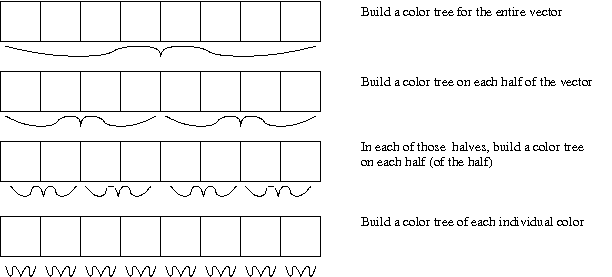
Is that the only way to build relatively balanced color trees? No. Another way to build a color tree is to start with a vector of all the colors and to systematically transform that vector into a tree. That is, we repeatedly “divide the vector of colors in half”, and recurse on the two halves of the vector.
But how do we divide a vector in half? It turns out that building new vectors for each half is inefficient. Hence, instead of building new vectors, we keep track of the starting and ending indices of the portion of interest. For example, to build a color tree from an eight element vector, we need to build the tree from the elements with indices 0..7.
-
To build a color tree from the eight elements with indices 0..7,
we need to
constogether (a) a tree built from the elements with indices 0..3 and (b) a tree built from the elements with indices 4..7.-
To build a color tree from the four elements with indices 0..3,
we need to
constogether (a) a tree built from the elements with indices 0..1 and (b) a tree built from the elements with indices 2..3.-
To build a color tree from the two elements with indices 0..1,
we need to
constogether (a) a tree built from the element with index 0 and (b) a tree built from the element with index 1.- To build a color tree from the element with index 0, we return the color at index 0.
- To build a color tree from the element with index 1, we return the color at index 1.
-
To build a color tree from the two elements with indices 2..3,
we need to
constogether (a) a tree built from the element with index 2 and (b) a tree built from the element with index 3.- To build a color tree from the element with index 2, we return the color at index 3.
- To build a color tree from the element with index 2, we return the color at index 3.
-
To build a color tree from the two elements with indices 0..1,
we need to
-
To build a color tree from the four elements with indices 4..7,
we need to
constogether (a) a tree built from the elements with indices 4..5 and (b) a tree built from the elements with indices 6..7.-
To build a color tree from the two elements with indices 4..5,
we need to
constogether (a) a tree built from the element with index 4 and (b) a tree built from the element with index 1.- To build a color tree from the element with index 4, we return the color at index 4.
- To build a color tree from the element with index 5, we return the color at index 5.
-
To build a color tree from the two elements with indices 6..7,
we need to
constogether (a) a tree built from the element with index 6 and (b) a tree built from the element with index 7.- To build a color tree from the element with index 6, we return the color at index 6.
- To build a color tree from the element with index 7, we return the color at index 7.
-
To build a color tree from the two elements with indices 4..5,
we need to
-
To build a color tree from the four elements with indices 0..3,
we need to
We can summarize this recursive process graphically in the following diagram.
So, how do we implement this process? We start with a helper procedure.
;;; Procedure:
;;;   subvector->ctree
;;; Parameters:
;;;   colors, a vector of colors
;;;   start-index, an integer
;;;   end-index, an integer
;;; Purpose:
;;;   Build a color tree from the portion of vector with indices
;;;   start-index to end-index, inclusive.
;;; Produces:
;;;   ctree, a color tree
;;; Preconditions:
;;;   colors is nonempty.
;;;   0 <= start-index <= end-index <= (vector-length colors)
;;; Postconditions:
;;;   The colors at indices start-index to end-index of colors appear
;;;     in ctree, in the same order.
;;;   (tree-size ctree) is (+ 1 (- end-index start-index))
;;;   The tree is balanced.  That is, the sizes of the left and
;;;     right subtrees differ by no more than one, and both subtrees
;;;     are balanced.
We can then turn a whole vector into a tree by calling this procedure.
(define vector->ctree
  (lambda (colors)
    (subvector->ctree colors 0 (- (vector-length colors) 1))))
Implement subvector->tree.
Note: Our example above always used even size subvectors. If the subvector has an odd length, you can split it either way (with the first half larger or with the second half larger). For example, If you need to split the seven-element subvector at positions 7..13, you can either split into the 7..10 and 11..13 or into 7..9 and 10..13.
Problem 4: Randomized Color Trees
A potential disadvantage of the procedures we've written to generate color trees is that they are completely predictable. Given particular values, we can always determine in advance how the trees they build will be structured.
It is sometimes interesting to create “randomized” color trees, color trees whose particular structure is difficult to determine. How can we create these color trees? Recursively, of course.
- To build a random color tree of size 1 from a vector of colors, randomly choose one of those colors.
- To build a color tree of size N from a vector of colors, pick a random size, M (between 1 and N-1), for the left subtree build random color trees of size M and N-M, and cons them together.
Note that you can generate a random integer in the range 0..K-1 with
(random K).
Document and write a procedure, (,
that builds a random color tree of the specified size from the vector
of colors using the process described above.
random-color-tree
size colors)
Problem 5: Balanced Trees
As you may have noted, the trees we've been building vary significantly in how the sizes of the two halves relate. The trees built in problem 1 always had a left subtree of size 1 and a right subtree of size N-1. The trees built in problem 2 should have been a bit more balanced, with approximately N/2 values on each side of the tree.
Computer scientists tend to like balanced trees (although not necessarily for this application). Hence, it is useful to have a predicate that tests whether a tree is balanced. How do we decide if a tree is balanced?
- The sizes of the subtrees differ by no more than 1.
- The left subtree is balanced.
- The right subtree is balanced.
It is relatively straightforward to turn this definition into a procedure.
(define tree-balanced?
  (lambda (tree)
    (or (not (pair? tree))
        (let ((left-size (tree-size (car tree)))
              (right-size (tree-size (cdr tree))))
          (and (<= (abs (- left-size right-size)) 1)
               (tree-balanced? (car tree))
               (tree-balanced? (cdr tree)))))))
Ideally, for a tree of size N, this procedure would make about
N calls to tree-balanced and about
N calls to tree-size. But does it?
a. Build a variety of trees of sizes 4, 8, and 16 (perhaps three
of each size) and determine how many calls to
tree-balanced and how many calls
to tree-size are made.
b. You will find that your procedure makes significantly more than
N calls to tree-size for a balanced tree of size N.
Explain why.
c. Write a new version of tree-balanced? that has
a total number of procedure calls that is no more than a four times
the size of the tree.
Hint: Write a helper that combines
the purposes of tree-size and
tree-balanced?. If a tree is balanced,
the helper should return its size. If a tree is unbalanced,
the helper should return #f.
Hint: You may want to use let to
keep track of the size of the subtrees.
Extra Credit: Drawing a Tree
You've seen that we've included box-and-pointer diagrams that show pairs (cons cells) linked together to make trees. While we generated some of those by hand, we could have equally well generated them programmatically. Write a program that, given a color tree, draws a box-and-pointer diagram of the tree. For the leaves of the tree, draw a small circle of the appropriate color.
