Mini-Project 5: Combining images
- Assigned
- Wednesday, 6 March 2024
- Summary
- In this assignment, we will consider ways to build more complex images by combining the elements in lists of images. In contrast to the previous assignment, which also used lists of shapes, we will process these lists of shapes using recursion.
- Collaboration
- Each student should submit their own responses to this project. You may consult other students in the class as you develop your solution. If you receive help from anyone, make sure to cite them in your responses.
Please start with the template code.
Please save all of your work as combining-images.rkt.
Introduction
Disclaimer: This contextual narrative is fictional.
The other day, as some CSC-151 students were showing their work to the local artists’ collective, those artists found themselves particularly engaged by the somewhat Warholian grids of images you made. As you may recall, you built complex nested lists of images and then processed lists by alternating stacking and sequencing of images. Although those lists were relatively complex, you were able to process them in a relatively straightforward way by using map, apply, reduce, and perhaps even filter.
The collective believe that the code you’re writing may help them in a project in which they are combining slightly-modified versions of images as a reflection on how shifting perspectives and presentations of images can lead to a loss of certainty. For example, they’ve created the following version of our favorite cat as a sketch of a work about felininity.
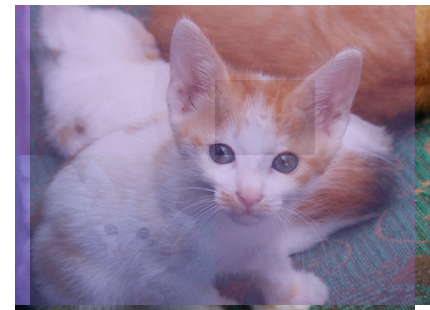
As you may note, the slight shifts and resizing lead to questions of focus and blur our understanding of the kitten.
Unfortunately, the collective have not yet taken CSC-151 and have asked for your help.
Now that you’ve learned a bit of recursion, you can start to consider other ways to process lists of images, including, perhaps, supporting the collective in the Loss of Certainty series. For example, you might provide tools to automatically build a sequence of variants of an image (just one level of depth) and, perhaps, combine those in different ways.
Part 1: Combining elements in multiple ways
As you likely discovered, you can put all of the images in a list beside each other with a procedure like the following.
;;; (arrange-horizontally images) -> image?
;;;   images : (list-of image?)
;;; Arrange all of the images in `images` in a row, beside each other.
(define arrange-horizontally
  (lambda (images)
    (cond
      [(null? images)
       (solid-rectangle 0 0 (rgb 0 0 0 0))]
      [(null? (cdr images))
       (car images)]
      [else
       (apply beside images)])))
But what if we want to vary what we’re doing, perhaps alternating between putting things beside each other and above each other. We might do so by writing something not quite like reduce.
a. Document, write at least three tests for, and write a procedure, (pair-horizontally images), that takes a list of images as a parameter and returns a new list of approximately half the length in which each element is created by putting two elements of the first list next to each other.
b. Document, write at least three tests for, and write a procedure, (pair-vertically images), that behaves much like pair-horizontally, but puts the two images above each other.
c. Document the following procedures. Also add a note in your code explaining how this works.
(define gridify-hv
  (lambda (images)
    (cond
      [(null? images)
       (transparent-rectangle 0 0)]
      [(null? (cdr images))
       (car images)]
      [else
       (gridify-vh (pair-horizontally images))])))

(define gridify-vh
  (lambda (images)
    (cond
      [(null? images)
       (transparent-rectangle 0 0)]
      [(null? (cdr images))
       (car images)]
      [else
       (gridify-hv (pair-vertically images))])))
d. Of course, to achieve the collective’s goals, you’ll also need a way to overlay semi-transparent versions of images. Fortunately, your instructor has provided you with a useful procedure. (You’ll see the helpers in the starter code.)
;;; (overlay-alt top-image bottom-image) -> image?
;;;   top-image : image?
;;;   bottom-image : image?
;;; Overlay `top-image` on `bottom-image`, combining the two images
;;; in the positions in which they overlap.
(define overlay-alt
  (lambda (top-image bottom-image)
    (set-transparency (overlay (set-transparency top-image 140)
                               bottom-image)
                      255)))
Write a procedure, (overlay-pairs images), that behaves much like pair-horizontally and pair-vertically, except that it uses overlay-alt instead of beside or above.
e. Write a procedure, (overlaid-grids images), that behaves much like gridify-hv and grididfy-vh, except that it pairs horizontally first, then vertically, and then overlays pairs before going back to horizontal, vertical, overlay, etc.
Part 2: Making lists of images
We’re not quite yet ready to support the collective. We should first gain some practice in automatically building lists of images so that we can do more experiments with the prior procedures.
One technique for building large lists involves treating a list of digits (exact integers between 0 and 9, inclusive) as instructions for creating shapes.
What do we mean by that?
Well, we could treat the first digit in a list as code for what shape we want. Perhaps
- 0, 1, and 2 could represent a solid circle of diameter 30;
- 3, 4, and 5 could represent a solid square of side-length 30;
- 6 and 7 could represent a solid diamond of width 30 and height 30; and
- 8 and 9 could represent a solid equilateral triangle of edge-length 30.
The next digit in the list would then represent the color, using the following procedure.
;;; (digit->color digit) -> rgb?
;;;   digit : (all-of exact-integer? (at-least 0) (at-most 9))
;;; Convert a digit to a color (e.g., when building a list of shapes from
;;; a list of digits).
(define digit->color
  (lambda (digit)
    (list-ref (list (rgb 255 0 0) (rgb 255 255 0) (rgb 0 255 0) (rgb 0 255 255)
                    (rgb 0 0 255) (rgb 255 0 255) (rgb 0 0 0) (rgb 255 255 255)
                    (rgb 85 85 85) (rgb 170 170 170))
              digit)))
a. Write at least five tests for, and implement a procedure, (simple-shape type colornum), that takes two digits as parameters and returns the corresponding shape (according to the policies above).
b. Write at least three tests for and document a procedure, (simple-shapes digits), that takes a list of digits as a parameter and applies simple-shape to neighboring pairs of digits to create a list of shapes. For example, if the first two digits are 3 and 4, the first element of your result should be a blue (4) solid square (3).
Note that if there is only one digit left in the list, you cannot create a shape, and should return the empty list.
If you find it difficult to make your own lists of digits, you may find the following procedure useful.
;;; (string->digits str) -> (list-of digit?)
;;;   string : string?
;;; Convert a string to a list of digits in a strange but predictable
;;; way.
;;;
;;; Used primarily to build lists of digits for various procedures.
(define string->digits
  (lambda (str)
    (map (o string->number string)
         (string->list (reduce string-append
                               (map (o number->string char->integer)
                                    (string->list str)))))))
> (string->digits "hello world")
'(1 0 4 1 0 1 1 0 8 1 0 8 1 1 1 3 2 1 1 9 1 1 1 1 1 4 1 0 8 1 0 0)
> (string->digits "HELLO WORLD")
'(7 2 6 9 7 6 7 6 7 9 3 2 8 7 7 9 8 2 7 6 6 8)
c. The simple shapes are, as the name suggests, fairly simple. Let’s expand our shapes a bit, using the digits to indicate the type of shape, the size of the shape, and the color of the shape.
We’ll have a few more procedures to help us determine sizes and outline sizes.
;;; (digit->size digit) -> positive-integer?
;;;   digit : digit?
;;; Determine a size based on digit.
(define digit->size
  (lambda (digit)
    (+ 20 (* 2 digit))))

;;; (digit->pen-size digit) -> positive-integer?
;;;   digit : digit?
;;; Determine a pen-size based on a digit
(define digit->pen-size
  (lambda (digit)
    (+ 1 digit)))
Write at least three tests for and implement a procedure, (more-shapes digits), that takes a list of digits as a parameter and makes shapes as follows.
- If the first digit is 0, it makes a solid circle using the next digit as the size, and the digit after that as the color.
- If the first digit is 1, it makes a solid square using the next digit as the size and the digit after that as the color.
- If the first digit is 2, it makes a solid equilateral triangle using the next digit as the size and the digit after that as the color.
- If the first digit is 3, it makes an outlined circle using the next digit as the size, the digit after that as the color, and the digit after that as the pen size.
- If the first digit is 4, it makes an outlined square using the next digit as the size, the digit after that as the color, and the digit after that as the pen size.
- If the first digit is 5, it makes a solid rectangle using the next digit as the width, the digit after that as the height, and the digit after that as the color.
- If the first digit is 6, it makes a solid ellipse using the next digit as the width, the digit after that as the height, and the digit after that as the color.
- If the first digit is 7, it makes a solid diamond using the next digit as the width, the digit after that as the height, and the digit after that as the color.
- If the first digit is 8, it makes an outlined ellipse using the next digit as the width, the digit after that as the height, the digit after that as the color, and the digit after that as the pen size.
- If the first digit is 9, it makes an outlined rectangle using the next digit as the width, the digit after that as the height, the digit after that as the color, and the digit after that as the pen size.
In all cases, you should recurse on the remaining digits in the list to continue making shapes.
Note: If not enough digits remain in the list, just return the empty list.
Note: You may want to write a helper procedure, such as (at-least-n-elements lst n), that determines if there are enough elements left in the list. (For an E, you’ll need to avoid using length.)
Part 3: Lists of image variants
Rather than making lists of shapes, we can make lists of transformed images.
a. Write a procedure, (variants img digits), that takes an image and a list of digits as parameters, and makes a list of transformed versions of the image using the following policies.
- If the first digit is 0, 1, or 2, use
pixel-mapto average each pixel with a color computed from the next three digits. Multiply each digit by 25 to determine the corresponding red, blue, or green component. - If the first digit is 3, make a horizontally flipped version of the image (using
hflip). - If the first digit is 4, make a vertically flipped version of the image (using
vflip). - If the first digit is 5, make a rotated version of the image. Use the next digit to determine what the rotation should be.
- 0, 1, 2: 90 degrees
- 3, 4, 5, 6: 180 degrees
- 7, 8, 9: -90 degrees or 270 degrees
- If the first digit is 6, horizontally shift by a number computed from the next digit. You can use
(hshift img amt)to horizontally shift an image. - If the first digit is 7, vertically shift by a number computed from the next digit. You can use
(vshift img amt)to vertically shift an image. - If the first digit is 8, scale by a factor computed from the next digit.
- If the first digit is 9, make a half-size copy aligned according to the next two digits.
For example, if our list starts '(2 5 0 3 4 ...), we should create the first element of our list of variants by averaging each pixel in the original with (rgb 125 0 75) and then shove the result on the front of the list we get by recursing on '(4 ...), the cddddr of the original list.
(cons (pixel-map (cut (rgb-average <> (rgb 125 0 75))) img)
      (variants img (drop digits 4)))
Similarly, if our list starts with '(4 5 0 3 4 ...), the first element of our result list will be a vertically flipped version of our image. The remainder will be what we get by converting '(5 0 3 4 ...).
Here’s the procedure to compute a shift.
;;; (digit->shift digit) -> positive-integer?
;;;   digit : digit?
;;; Determine a horizontal or shift based on digit.
(define digit->shift
  (lambda (digit)
    (+ 3 (* (- digit 5) 4))))
Here’s the procedure to compute the scale factor.
;;; (digit->scale-factor digit) -> positive-real?
;;;   digit : digit?
;;; Determine a scale factor based on the digit.
(define digit->scale-factor
  (lambda (digit)
    (+ 1 (* 1/30 (+ 1 (* (- digit 5) 2))))))
Here’s a procedure to set up the half-size copy appropriately.
;;; (half-size img halign valign) -> image?
;;; Create a half-size version of the image, aligned in the space of
;;; the image as specified.
;;;
;;; * `halign` should be "left", "center", or "right".
;;; * `valign` should be "top", "center", or "bottom".
(define half-size
  (lambda (img halign valign)
    (overlay/align halign valign
                   (scale img 1/2)
                   (transparent-rectangle (image-width img)
                                          (image-height img)))))
And a pair of procedures to convert a digit to an alignment.
;;; (digit->halignment digit) -> (one-of "left" "center" "right")
;;;   digit : digit?
;;; Convert a digit to a horizontal alignment.
(define digit->halignment
  (lambda (digit)
    (list-ref (list "left" "center" "right")
              (remainder digit 3))))

;;; (digit->valignment digit) -> (one-of "top" "center" "bottom")
;;;   digit : digit?
;;; Convert a digit to a vertical alignment.
(define digit->valignment
  (lambda (digit)
    (list-ref (list ""top "center" "bottom")
              (remainder digit 3))))
b. Only necessary for an E.
As you may have noted, our friends in the arts collective likely want to apply multiple transformations to each image. Fortunately, we can use our lists of digits for such purposes, too.
Write a procedure, (complex-variants img digits), that takes an image and a list of digits as parameters, and makes a list of transformed versions of the image using the following policies.
- If the first digit is 0, 1, or 2, you should do one transformation (as in
variants) based on the following digits. For example, if our list begins'(2 5 3 0 4 9 6 2 8 ...), we’ll build the first image in the transformed list by rotating (5) the image by 180 degrees (3). We’ll biuld the remaining images by recursing starting with'(0 4 9 6 2 8 ...). - If the first digit is 3, 4, or 5, you should do two transformations (as described in
variants). For example, if our list begins'(4 5 3 0 4 9 6 2 8 ...), we’ll build the first image in the transformed list by first rotating (5) the image by 180 degrees (3) and then recoloring (0) the result by averaging it with (rgb 100 225 150) (4 9 6) We’ll build the remaining images by recursing starting with'(2 8 ...). - If the first digit is 6, 7, or 8, you should do three transformations (as described in
variants). - If the first digit is 9, you should do four transformations (as described in
variants).
Note: If there aren’t enough digits left in the list to make all the variations, do as many as possible.
Note that _complex-variants is only necessary for an E._
Part 4: Freestyle
a. Using these procedures and any others you write, write a procedure, (shifting-perspectives img str), that takes an image and a string as parameters and creates a new image based on the image and digits we get from (string->digits str). For example, you might call variants on the appropriate parameters and then use gridify-hv to put all those variants into something like a grid.
(define shifting-pespectives
  (lambda (img str)
    ...))
To earn an E, you will need to write at least two additional recursive procedures that contribute meaningfully to shifting-perspectives.
b. Provide three images, uncertain-01.png, uncertain-02.png, and uncertain-03.png, that demonstrate the use of your procedure on an image and three strings of your choice. Please make sure to document which strings you used in your code.
What to upload
Please upload the following.
[ ] The code file, `combining-images.rkt`.
[ ] The three images you produced.
    [ ] `uncertain-01.png`.
    [ ] `uncertain-02.png`.
    [ ] `uncertain-03.png`.
[ ] The source image you used to create those three images.
Rememember
[ ] Review the rubric!
[ ] If you reference files (e.g., images), make sure to have them in the
    same directory and just use the base file name (e.g., "kitten.jpg").
[ ] Include any images you reference directly.
[ ] Avoid including expressions that do computation in `combining-images.rkt`.
    Your definitions belong in the definitions pane. Your sample expressions
    belong in the interactions pane (or commented-out in the definitions
    pane).
[ ] Make sure your code runs in DrRacaket before submitting.
[ ] Make sure your code doesn't generate any output when you click Run.
[ ] Make sure the autograder can run on your code. Ask help if it doesn't.
[ ] Submit early so that you can correct or ask questions about any issues
    identified by the autograder.
Grading rubric
Still under development, but nearly complete.
Redo or above
Submissions that lack any of these characteristics will get an I.
[ ] Passes all of the autograder tests labeled "I".
[ ] Includes the specified file, `combining-images.rkt`.
[ ] Includes an appropriate header on the file that indicates the
    course, author, etc.
[ ] Acknowledges appropriately.
[ ] Code runs in DrRacket.
[ ] Most procedures are documented in some form.
Meets expectations or above
Submissions that lack any of these characteristics but have all of the prior characteristics will get an R.
[ ] Passes all of the autograder tests labeled "M".
[ ] Includes the required image files.
    [ ] The source image
    [ ] `uncertain-01.png`.
    [ ] `uncertain-02.png`.
    [ ] `uncertain-03.png`.
[ ] Code is well-formatted with appropriate names and indentation.
[ ] Code has been reformatted with Ctrl-I before submitting.
[ ] Code generally follows style guidelines.
[ ] All procedures are documented.
[ ] Includes all the specified tests.
    [ ] 1a. pair-horizontally
    [ ] 1b. pair-vertically
    [ ] 2a. simple-shape
    [ ] 2b. simple-shapes
    [ ] 2c. more-shapes
Exemplary / Exceeds expectations
Submissions that lack any of these characteristics but have all of the prior characteristics will get an M.
[ ] Passes all of the autograder tests labeled "E".
[ ] Includes a working version of `complex-variants`.
[ ] `complex-variants` (freestyle) relies on at least two new, useful,
    recursive procedures.
[ ] Style is impeccable (or nearly so).
[ ] Each set of tests includes at least one edge case (e.g., an empty
    list, if appropriate).
    [ ] 1a. pair-horizontally
    [ ] 1b. pair-vertically
    [ ] 2a. simple-shape
    [ ] 2b. simple-shapes
    [ ] 2c. more-shapes
[ ] Avoids using `length` in computing whether we have enough elements
    in a list (e.g., in `more-shapes`, `variants`, and `complex-variants`).
Q&A
Testing
Do we have to write tests for every procedure?
No. Only those we expicitly ask you to test.
Should we at least one edge case in each set of tests?
Preferably. You must have edge cases if you want to earn an E.
Part 1
Part 2
I have a very long cond statement for more-shapes. Do you have a recommendation for how to make my code a bit more concise?
I’d break the problem up into “shapes that need two values”, “shapes that need three values”, and “shapes that need four values”, writing a procedure for each one.
What width and height should I use for, say, rectangles and ellipses?
You should use
digit->sizeof the appropriate list entry to convert numbers to widths and heights.
Part 3
Was there an error in digit->valignment?
Yes. It’s been fixed.
Part 4
I have a great idea that requires using two images rather than one. Can I have shifting-perspectives use two images?
You can make an alternate version of
shifting-perspectives(with a different name) that takes two images as parameters. But you should also have one that takes only one image. At worst, you can have it call your two-image version with two copies of the same image.
Miscellaneous
I’m getting an error related to anything with transparent-rectangle.
Make sure to update your
csc151library.
How do I make a solid diamond?
(solid-diamond width height color)
What exactly is meant by “the digits”?
A digit is a number between 0 and 9 (a digit of a number). So “the digits” refers to a list of digits, either created manually or with some procedure, such as
string->digits.
Can you give some examples of each of the procedures?
You can see some in the video walk-through.