Assignment 4: From Color Transformations to Simple Image Filters
Due: 10:30 p.m., 17 February 2015
Summary: In this assignment, you will explore mechanisms for transforming colors and see how those mechanisms can then be applied to images. Our primary focus is on color transformations.
Purposes: To give you more experience with colors and color transformations. To explore the power of higher-order procedures. TO have a bit of fun.
Collaboration: You must work with assigned partners on this assignment. You may discuss this assignment with anyone, provided you credit such discussions when you submit the assignment.
Submitting:
Email your answer to <grader-151@cs.grinnell.edu>. The title of your
email should have the form CSC 151.00 Assignment 4
and should contain your answers to all parts of the assignment.
Scheme code should be in the body of the message. You should not
attach any images; we should be able to re-create them from your code.
Warning: So that this assignment is a learning experience for everyone, we may spend class time publicly critiquing your work.
Background
You have recently begun to explore the RGB color model as well as
functions that transform RGB colors. You have seen a wide variety
of built-in color transformations, including
irgb-complement, irgb-lighter,
and irgb-redder. You have also started to think
about how you might write your own color transformations. In general,
those transformations will have a form something like the following.
(define irgb-transform
  (lambda (color)
    (irgb (function-to-compute-new-red-component color)
          (function-to-compute-new-green-component color)
          (function-to-compute-new-blue-component color))))
For example, to decrease each of the components by 32, we might write:
(define irgb-subtract-32
  (lambda (color)
    (irgb (- (irgb-red color) 32)
          (- (irgb-green color) 32)
          (- (irgb-blue color) 32))))
You've also seen that we can use a color transformation to transform a pixel in an image.
(image-transform-pixel! canvas 0 0 irgb-subtract-32)
But doing things a pixel at a time is hard. Fortunately,
Mediascheme comes with a procedure very much like
image-transform-pixel!, except
that it works on every pixel in the image. The procedure
( makes a new image
by applying image-variant image
color-transformation)color-transformation to each pixel
in image. You may want to experiment with it
a bit, as in the following.
> (define kitten (image-show (image-load "/home/rebelsky/Desktop/kitten.jpg")))
> (image-show (image-variant kitten irgb-redder))
> (image-show (image-variant kitten irgb-complement))
As you may have noted, by using image-variant and
a color transformation, we have effectively written a simple image
filter, akin to those that come with Adobe Photoshop and other
image editing applications.
In this assignment, you will build some color transformations and explore their utility as image filters.
Assignment
Problem 1: Cycling Through Colors
As you've seen, when we apply the typical color transformation, such
as irgb-darker or irgb-redder,
we eventually reach a limit of 0 or 255. But we can get some interesting
effects by “wrapping around” at the end. For example, here's
the output from a function that add 85 to a number, wrapping when we hit
255.
> (cyclic-add-90 75)
165 ; 75 + 90 = 165
> (cyclic-add-90 165)
255 ; 165 + 90 = 255
> (cyclic-add-90 166)
0 ; 166 + 90 = 256, wrap around to 0
> (cyclic-add-90 255)
89 ; we wrap around because we hit 255
> (cyclic-add-90 89)
179 ; 89 + 90 = 179
> (cyclic-add-90 179)
13 ; 179 + 90 = 269, 269 - 256 = 13
We can do the same thing with subtraction.
> (cyclic-subtract-40 90)
50 ; 90 - 40 = 50
> (cyclic-subract-40 50)
10 ; 50 - 40 = 10
> (cyclic-subtract-40 10)
226 ; 10 - 40 = -30; 256 - 30 = 226
a. Write cyclic-add-90 and cyclic-subtract-40. You may find either the remainder or the modulus function useful in doing so.
b. Write (, which varies irgb-cyclic-vary-b irgb-color)irgb-color by cyclicly adding 23 to the red component, subtracting 31 from the green component, and adding 37 to the blue component.
Try making a few variants of an image of your choice.
> (define kitten (image-load "/home/rebelsky/Desktop/kitten.jpg"))
> (image-show kitten)
> (image-show (image-variant kitten irgb-cyclic-vary-b))
> (image-show (image-variant (image-variant kitten irgb-cyclic-vary-b)
                             irgb-cyclic-vary-b))
> (image-show (image-variant (image-variant (image-variant kitten
                                                           irgb-cyclic-vary-b)
                                            irgb-cyclic-vary-b)
                             irgb-cyclic-vary-b))
Problem 2: Flattening Colors
One common technique for manipulating images is to “flatten” the colors in the image, using a much more restricted scale. For example, we might ensure that the components are each multiples of 16, 32, or 64. (Well, we'll use 255 instead of 256 for the highest multiple.)
How do we convert each component to the appropriate multiple? Consider the case of multiples of 32. If we divide the component by 32, round, and then multiply by 32, we'll get the nearest multiple of 32. For example,
>(* 32 (round (/ 11 32)))0>(* 32 (round (/ 21 32)))32>(* 32 (round (/ 71 32)))64>(* 32 (round (/ 91 32)))96>(* 32 (round (/ 211 32)))224>(* 32 (round (/ 255 32)))256
As the last example suggests, we may sometimes get a number outside
of the range 0..255. Fortunately, the irgb and
irgb-new functions treat 256 the same as 255.
Document and write a procedure,
(, that flattens an IRGB color by converting each component to the nearest multiple of 32.
irgb-flatten-32 irgb-color)
You may then want to see the effect this procedure has on various images.
> (define kitten (image-load "/home/rebelsky/Desktop/kitten.jpg"))
> (image-show kitten)
> (image-show (image-variant kitten irgb-flatten-32))
Problem 3: Flattening Colors, Revisited
As you've begun to see, we are often better off writing generalized
procedures. Let's explore how we might generalize
irgb-flatten-32.
Document and write a procedure, (
that flattens an integer-encoded RGB color,
irgb-flatten
irgb-color base)irgb-color, by converting each component
of irgb-color to the nearest multiple of
base.
At the end of this assignment, you can find a test suite for
irgb-flatten.
Problem 4: Gamma Correction
Because humans do not perceive brightness linearly, some image formats modify the meaning of the stored values' brightness scale (0-255) to better cover the range of sensitivities with a nonlinear transformation.
The typical transformation is commonly called a Gamma
correction, for the name of the parameter used to determine
the extent of rescaling. In particular, when a color component
brightness value is on the real-valued scale of 0-1 (rather than our
discrete 0-255 scale), the transformation is given by
Vout =
  Vingamma
. You can
read more about this transformation at Wikipedia if you're curious,
or simply forge ahead with the assignment if you're not.
In this problem, you will implement a series of steps to do this gamma correction on an image.
a. Write a procedure, (, that takes a color component
value (i.e., a signle number in the range 0-255), and applies the
gamma correction described above. Note that you'll need to rescale
the component to the range 0-1 (by dividing) before you exponentiate
and rescale it back to 0-255 (by multiplying) afterward.
transform-value
component
gamma)
b. Write a procedure, (,
that applies irgb-correct
irgb-color gamma)transform-value to each component
of irgb-color using gamma.
Since image-variant expects a single-parameter
procedure, we'll need to build particular versions of
irgb-correct for different gammas. (You'll
learn a way to avoid building these particular versions in the future.)
(define irgb-correct-2.2
  (lambda (color)
    (irgb-correct color 2.2)))
(define irgb-correct-0.45
  (lambda (color)
    (irgb-correct color 0.45)))
You can explore the power of irgb-correct
by applying one of these to every pixel in an image.
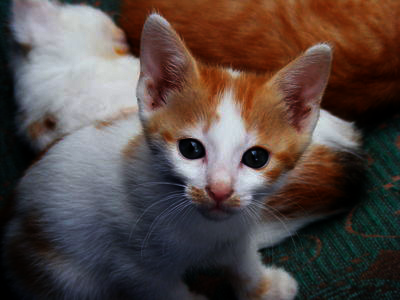
(image-variant kitten irgb-correct-2.2)
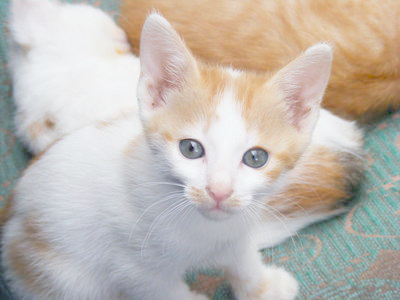
(image-variant kitten irgb-correct-0.45)
Problem 5: Make Your Own
Design your own color transformation and explore its application to an image or images of your choice. You should only turn in the transformation; we will explore its effect on various images.
Important Evaluation Criteria
We will judge your solutions on their correctness, conciseness, and cleverness.
A Test Suite for irgb-flatten
Here is a sample test suite for irgb-flatten. You'll note
that we've used a variety of bases and inputs. We've also made a
somewhat strange choice: Rather than directly using the output of
irgb-flatten, we've converted that output to a string
and compared strings. Why? Because that way, when a test fails,
you'll see the components, and that may suggest why things have not
worked as they should.
(define BLACK (color-name->irgb "black"))
(define WHITE (color-name->irgb "white"))

(define irgb-flatten-tests
  (test-suite
   "tests of irgb-flatten"
   (test-case
    "black, different bases"
    (check-equal? (irgb-flatten BLACK 16) BLACK)
    (check-equal? (irgb-flatten BLACK 37) BLACK)
    (check-equal? (irgb-flatten BLACK 120) BLACK)
    (check-equal? (irgb-flatten BLACK 128) BLACK))
   (test-case
    "white, standard bases"
    (check-equal? (irgb-flatten WHITE 16) WHITE)
    (check-equal? (irgb-flatten WHITE 128) WHITE))
   (test-case
    "white, strange bases"
    ; 259 is the closest multiple of 37, should shift to 255
    (check-equal? (irgb-flatten WHITE 37) WHITE)
    ; 240 is the closest multiple of 120
    (check-equal? (irgb->string (irgb-flatten WHITE 120))
                  "240/240/240"))
   (test-case
    "small components, rounding down"
    (check-equal? (irgb-flatten (irgb 3 3 3) 32) BLACK)
    (check-equal? (irgb-flatten (irgb 17 18 19) 64) BLACK)
    (check-equal? (irgb-flatten (irgb 9 4 7) 23) BLACK))
   (test-case
    "large components, rounding up"
    (check-equal? (irgb-flatten (irgb 230 240 250) 64) WHITE)
    (check-equal? (irgb-flatten (irgb 230 240 250) 128) WHITE)
    (check-equal? (irgb->string (irgb-flatten (irgb 230 240 250) 50))
                  "250/250/250"))
   (test-case
    "almost midway between multiples"
    (check-equal? (irgb->string (irgb-flatten (irgb 21 61 221) 40))
                  "40/80/240")
    (check-equal? (irgb->string (irgb-flatten (irgb 19 59 219) 40))
                  "0/40/200")
    (check-equal? (irgb->string (irgb-flatten (irgb 18 53 193) 35))
                  "35/70/210")
    (check-equal? (irgb->string (irgb-flatten (irgb 17 52 192) 35))
                  "0/35/175"))
   (test-case
    "different components, all round up"
    (check-equal? (irgb->string (irgb-flatten (irgb 17 58 195) 20))
                  "20/60/200")
    (check-equal? (irgb->string (irgb-flatten (irgb 23 18 21) 32))
                  "32/32/32")
    (check-equal? (irgb->string (irgb-flatten (irgb 65 90 118) 127))
                  "127/127/127"))
   (test-case
    "different components, all round down"
    (check-equal? (irgb->string (irgb-flatten (irgb 35 175 210) 17))
                  "34/170/204")
    (check-equal? (irgb->string (irgb-flatten (irgb 210 175 35) 17))
                  "204/170/34")
    (check-equal? (irgb->string (irgb-flatten (irgb 130 90 200) 64))
                  "128/64/192"))
   (test-case
    "different components, round in different ways"
    (check-equal? (irgb->string (irgb-flatten (irgb 35 180 205) 18))
                  "36/180/198")
    (check-equal? (irgb->string (irgb-flatten (irgb 89 34 55) 11))
                  "88/33/55")
    (check-equal? (irgb->string (irgb-flatten (irgb 60 150 200) 128))
                  "0/128/255"))
   (test-case
    "base of 1 should leave values unchanged"
    (check-equal? (irgb->string (irgb-flatten (irgb 17 31 93) 1))
                  "17/31/93")
    (check-equal? (irgb-flatten BLACK 1) BLACK)
    (check-equal? (irgb-flatten WHITE 1) WHITE)
    (check-equal? (irgb->string (irgb-flatten (color->irgb "turquoise") 1))
                  (irgb->string (color->irgb "turquoise"))))))
Remember that to use these tests, you'll need to add
(require rackunit) and (require rackunit/text-ui)
to the top of your program.
To run the tests, simply type (run-tests irgb-flatten-tests)
in your interactions pane.