Assignment 6: Conditionals and Colors
Due: 10:30 p.m., Tuesday, 15 October 2013
Summary: You will explore color types and some novel color transformations.
Purposes: To practice conditionals and have some fun with the HSV color representation.
Collaboration: If you have been assigned to a group, you must work with your assigned partners on this assignment. The partner assignments are available at http://www.cs.grinnell.edu/~rebelsky/Courses/CSC151/2013F/partners/assignment.06.txt. You may discuss this assignment with anyone, provided you credit such discussions when you submit the assignment.
Wrapper (Prologue): Individually read through this assignment and make sure that you understand what is required. Then use the form available at http://bit.ly/151hw6pro to indicate (a) how long you think this assignment will take and (b) what you think will be the most challenging aspect of this assignment.
Wrapper (Epilogue): When you are done with the assignment, fill out the form available at http://bit.ly/151hw6epi to indicate (a) how long the assignment took, (b) what the most challenging part of the assignment was, and (c) something important you learned from doing the assignment. If you find that the assignment took much less or much more time than you expected, also include (d) a note as to what might have led to that difference.
Submitting:
Email your answer to <grader-151-02@cs.grinnell.edu>. The subject of your email
should have the form CSC 151.02 Assignment 6: Conditionals and Colors and
should contain your answers to all parts of the assignment. Scheme code
should be in the body of the message.
Warning: So that this assignment is a learning experience for everyone, we may spend class time publicly critiquing your work.
Assignment
Problem 1: Types
a. Write a predicate, (, that returns is-color?
value)#t
when value is either an RGB color or a color
name recognized by MediaScript. In all other cases, it should return
#f.
You can use the predicates rgb? and
color-name?, which are already defined, to help
you. You should not use the predicate color?; we
want you to write your own version.
b. Write your own version of color-to-rgb,
which is a very useful procedure.
Your procedure should have the following behavior:
If given an RGB color, it returns that color unchanged.
If given a color name, it returns the result of calling
color-name->rgb on that color name.
If given any other type of value, it returns #f.
You should not use the built-in color->rgb
procedure; we want you to write your own version.
Problem 2: Hue Transforms
As we learned in the reading on design and color representing colors in terms of hue, saturation, and value is an alternative to RGB representation. Hue represents the pure color (e.g., red, blue, yellow, green, or a combination of one of these). Saturation represents the "colorfulness" of the hue in the color. For instance, a completely saturated color would be a pure hue (like red), while a less saturated color might appear just as bright but somewhat faded (perhaps rose or pink). Value, then represents the brightness or darkness of the color.
As shown below, hue is represented as an angle, or a point on a circle. Thus, the values 0-360 sweep through colors red (0 degrees), yellow (60 degrees), green (120 degrees), cyan (180 degrees), blue (240 degrees), magenta (300 degrees), and back to red (at 360 or 0 degrees).
There are a variety of transformations that can take an RGB color and give an HSV representation. In this problem, we'll focus on just extracting the hue.
Before we describe how to calculate hue, we need some basic values
to refer to. Let
(red, green, blue)
refer to the red, green, and blue components of an RGB color,
respectively. The chroma of a color is the
largest of the RGB components minus the smallest of the RGB
components. For example, the chroma of (128,64,50) is 128-50, or 78;
the chroma of (0,255,0) is 255-0, or 255. The chroma of
(255,255,255) is 255-255, or 0.
The raw hue can then be calculated as follows:
-
(
green-blue)/chromaifredis a largest component -
((
blue-red)/chroma) + 2 ifgreenis a largest component -
((
red-green)/chroma) + 4 ifblueis a largest component -
if
chroma=0 the hue is undefined, because all the components are the same and we would have a gray. In this case, one convention is to set the hue to 0.
The raw hue as given above produces a value between -1 and 6 (corresponding to the 6 cardinal colors described above). If it is negative, we should add 6 to get us back to a positive representation. The final result is converted to the range 0-360 by multiplying by 60 degrees (which is 360/6).
What happens if chroma is not 0, and two of
the components are both the largest? If the formula is
well-designed, it shouldn't matter. Hence, you can try
the “largest component” tests in order.
Using the algorithm given above, write a
procedure (
that takes an RGB color and produces its hue. For example,
rgb->hue-angle rgb)
>(rgb->hue-angle (color->rgb "red"))0>(rgb->hue-angle (color->rgb "yellow"))60>(rgb->hue-angle (color->rgb "green"))120>(rgb->hue-angle (color->rgb "cyan"))180>(rgb->hue-angle (color->rgb "blue"))240>(rgb->hue-angle (color->rgb "magenta"))300>(rgb->hue-angle (color->rgb "pink"))7340/21>(round (rgb->hue-angle (color->rgb "pink")))350
Note: You may wish to use a let
statement or helper procedures to decompose your implementation into
managable, meaningful units. Please be sure to give your variables
and procedures meaningful names.
Problem 3: Changing Hue
Being able to manipulate the hue in a color can actually be quite
useful. MediaScheme can convert an HSV color into an RGB with the
procedure
(,
where hsv->rgb hsv-list)hsv-list is a three-element list
containing the hue, saturation, and value components of a HSV
color.
MediaScheme can also extract the saturation and value from an RGB
color with the procedures
(
and
rgb->saturation rgb)(.
rgb->value rgb)
Write a procedure
( that takes an RGB color and a hue value (in the range 0-360) and creates a new RGB color using the given hue with the saturation and value of rgb-change-hue rgb hue)rgb.
Warning! hsv->rgb only
works with exact numbers. Thus you may need to
use inexact->exact.
Problem 4: Hue-Based Transforms
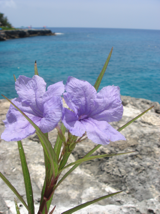
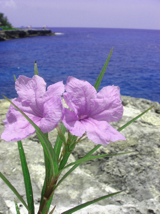
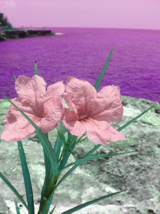
Color transformations based on hue be can visually interesting.
|
|
|
| Original Image | Hue rotated 30 deg | Hue rotated 90 deg |
a. Using the procedures you have written so far, write a procedure
(
that takes a color and produces a new rgb color where the HSV equivalent
has a hue rotated by rgb-rotate-hue rgb angle)angle degrees, a number
between 0-360.
Hint: If the rotated angle is greater than 360,
be sure to wrap around properly (e.g.,
using modulo) to get the correct hue angle.
b. Write an expression as concisely as possible that will rotate the
hues in an entire image (say, called picture) by 30 degrees.
Warning: When you
apply rgb-rotate-hue thousands of times (as you
will in an image of non-trivial size), it is likely to take some
time. Do your testing on small images.
Problem 5: Conditional Hue Transforms
Create your own RGB color transform that transforms the hue of its input color conditionally using a manner of your own choosing. For instance, you may choose to shift colors close to blue more toward green, leaving the rest unchanged.
Include a description of the effect of your transform in English. We
should be able to apply your transform using image-variant
or image-transform!.
Optional Bonus Problem: Generating Color Schemes
For extra credit, design, document, and implement a Color Scheme Generation Toolkit. Your toolkit should consist of a suite of related procedures. Each procedure will take an RGB color as a parameter and produce a list of colors forming a coherent color scheme. Some procedures may need to take additional parameters: You decide what those parameters will be. You will find the procedures related to hue, saturation, and value very useful.
You should at least write procedures to do the following:
- Pair a color with its true complement, 180 degrees away on the color wheel.
- Generate an analogous color scheme based on the given color.
- Generate a list of tints of a color.
- Generate a list of shades of a color.
- Generate a list of colors according to at least one other color scheme, based on the reading on design and color, the Color Scheme Designer, or another source of color schemes used by artists and designers.
